Quick & Easy Expense Manager! PayReco

Quick & Easy Expense Manager! PayReco Summary
Quick & Easy Expense Manager! PayReco is a with in-app purchases iOS app in Finance by Prime System Laboratory Co.,Ltd.. Released in May 2015 (11 years ago). Store metadata: updated Mar 16, 2016.
Store info: Last updated on App Store on Mar 16, 2016 .
0★
Ratings: 0
Screenshots


App Description
The PayReco is a very easy and quick your
personal expense manager. Taking a receipt photo,
or inputting amount using keypad on the spot is
only thing you should do! This simplicity makes
you keep managing your spending. PayReco clearly
shows your spending pattern with the simple
records.
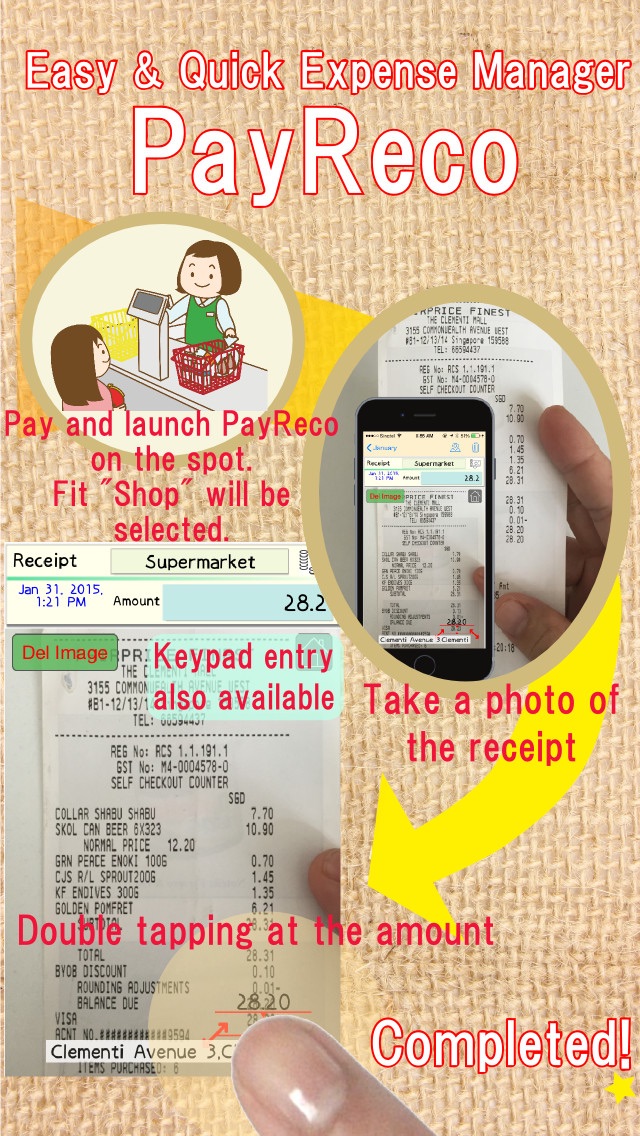
■All you have to is input the amount.
The amount can be inputted by image recognition
of a receipt photo or by hand.
After taking the receipt photo and double
tapping at the amount of the photo, the amount
is inputted automatically.
Keypad entry is also available.
It's better to record the receipt photo to
confirm the details of the payment later. If
you are in hurry, it's ok to enter the paid
money by hand.
■Inputing on the spot is a big key point.
The PayReco remembers the purchase locations.
Once you input a receipt and set the location as
"Supermarket", next time, PayReco finds out the
shop is "Supermarket" based on the location
automatically. So All you have to do is input
the amount. This custom also helps you not to
forget to enter the record.
■Showing clearly your spending pattern
Though the entering work is very easy and simple,
PayReco shows Spending Trend (Spent too much in
January!"), Spending Breakdown ("Education cost
is very huge this month!") and Budget & Spending
("I can afford this month till now!!")
■Overspending Warning
Let's set "Total Budget". If you've already
spent more than half of the budget when a half
month has passed, the pace of spending is too
fast! PayReco warns this case by vibrating once.
(Buzz!)
If you've already spent all "Total Budget",
PayReco warns by vibrating twice. (Buzz! Buzz!)
■You can use PayReco while travelling overseas
Once you select "Overseas mode" on entering the
paid money, the amount is calculated using
exchange rate. (The rate can be set in Settings.
)
■Managing family expense together
Please install PayReco on your family's iPhones.
Husband and wife can records their spending by
PayReco respectively. They can exchange and
unite receipt data by Data synchronization
function. The data exchange is made between
nearby iPhones using Wifi/Bluetooth.
■Monthly Report
Monthly Report can be seen as PDF file. You can
also send the file by e-mail. Printed these
files are very useful for analyzing in detail.
■About Shop and Account item
Major shops like Supermarket, restaur