道路情報ビューア


道路情報ビューア Summary
道路情報ビューア is a ad-supported Android app in Maps And Navigation by AOBO Co., Ltd. Released in Jan 2022 (4 years ago). It has about 28.9K+ installs and 36 ratings . Based on AppGoblin estimates, it reaches roughly 1K monthly active users and generates around $<10K monthly revenue (0% IAP / 100% ads). Store metadata: updated Apr 17, 2026.
Recent activity: 48 installs this week (156 over 4 weeks) showing below average growth View trends →
Store info: Last updated on Google Play on Apr 17, 2026 .
0★
Ratings: 36
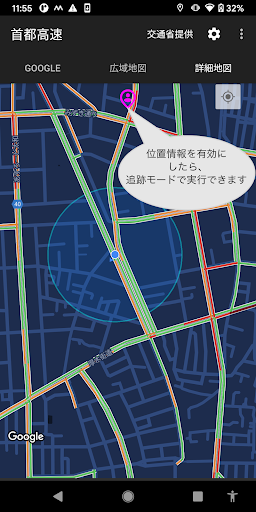
Screenshots


App Description
This is an app that allows you to check road information on Google Maps and the "Road Information Provision System" provided by the Ministry of Land, Infrastructure, Transport and Tourism.
[Important Notice]
1. This app is not an official app of the Japanese government or the Ministry of Land, Infrastructure, Transport and Tourism (MLIT). Furthermore, we have no affiliation or relationship with these organizations.
2. Some of the information provided in this app is obtained or referenced from the following official website:
Ministry of Land, Infrastructure, Transport and Tourism Road Information Provision System
https://www.road-info-prvs.mlit.go.jp/roadinfo/
3. This app was independently developed by our company using the Google Map SDK and is not provided to the Japan Road Information Center or the Japanese Ministry of Land, Infrastructure, Transport and Tourism.
4. If location information is enabled when using this app, no location information is saved, transmitted, or shared.
Features:
1. You can check traffic information and traffic forecasts provided by Google.
How to open the traffic forecast screen:
Tap "Show traffic forecast" on the "Google" screen.
Tapping the "Back" button on your device will return you to the previous screen.
2. Designed to make Google Maps easier to view.
3. Since the app internally links to the "Road Information Provision System" operated by the Ministry of Land, Infrastructure, Transport and Tourism, there is no need to use a browser.
4. When location information is enabled, you can display the map in tracking mode.
Notes:
1. An internet connection is required.
2. Battery drain will be faster in tracking mode.
3. Location information is not required.
4. If you wish to enable location information, please follow the steps below:
Long-press the app icon, and when "App Info" appears, tap "App Info."
On the App Info screen, tap "Permissions."
On the App Permissions screen, enable location information.
Disclaimer:
1. This app is built based on publicly available information from Google Maps and the Ministry of Land, Infrastructure, Transport and Tourism, but we do not guarantee the accuracy or completeness of the information.
Actual traffic conditions may differ, so please use at your own discretion and responsibility.
2. The "Provided by the Ministry of Transport" feature in this app provides functionality for viewing the "Road Information Provision System" operated by the Ministry of Land, Infrastructure, Transport and Tourism. Before using this system, please check the copyright and disclaimer information on the "Road Information Provision System" website.
3. If the system used in this app undergoes maintenance or service suspension, the information displayed in the app may not be available.
4. We assume no responsibility whatsoever for any actions taken by users based on the information displayed in this app.