Mantis Gamepad Pro Beta


Mantis Gamepad Pro Beta Summary
Mantis Gamepad Pro Beta is a ad-supported, with in-app purchases Android app in Tools by NeuralMonkey Digital Ventures. Released in Jan 2021 (5 years ago). It has about 6.9M+ installs and 58.6K ratings with a 4.06★ (good) average. Based on AppGoblin estimates, it reaches roughly 971K monthly active users and generates around $100K+ monthly revenue (33% IAP / 67% ads). Store metadata: updated May 13, 2026, version 123.
Recent activity: 35.4K installs this week (119.1K over 4 weeks) showing steady growth , and 200 new ratings this week View trends →
Data tracking: SDKs and third-party integrations were last analyzed on Feb 15, 2026. The app's network data flows (API traffic to/from the app and its SDKs) were last crawled on Feb 15, 2026.
Store info: Last updated on Google Play on May 13, 2026 (version 123).
SDKs, Trackers & Permissions
Mantis Gamepad Pro Beta was last scanned for SDKs 2026-02-15. Below is the overview of third party companies detected in the app. The full list of raw SDKs, app permissions and unknown SDKs is available here.
AppGoblin saw Mantis Gamepad Pro Beta uses 9 Development Tools
 Square
 JetBrains IntelliJ
 Greenrobot
 Flutter
AppGoblin saw Mantis Gamepad Pro Beta uses 1 Analytics: Product
 Firebase
AppGoblin saw Mantis Gamepad Pro Beta uses 1 Ad Networks
 Google
AppGoblin saw Mantis Gamepad Pro Beta uses 1 Mediation
 AdMob
AdMobAppGoblin saw Mantis Gamepad Pro Beta uses 1 Business Tools
 Keepsafe
App Details
App Store
Ads & App-Ads.txt
AppGoblin SDK Scans
4.06★
Ratings: 58.6K
Screenshots

App Description
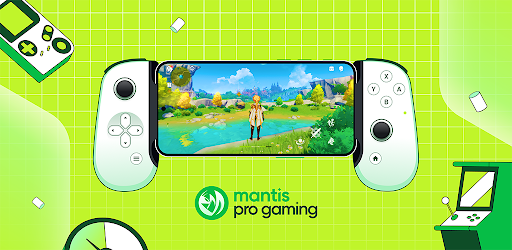
Turn your Phone into a Pro Gaming Console. Play Any Game With Any Gamepad.
Mantis Gamepad Pro is the most Modern & Intuitive Gamepad Screen Mapper App on Android. It is the Companion App your Powerful Gamepad deserves. With Mantis’ Screen Mapping Tech, you can Play any Android Game with any Gamepad Controller on any Android Device.
Mantis has been specifically tested with Major Android Games like Call of Duty Mobile, Genshin Impact, PUBG, Pokemon Unite, League of Legends: Wild Rift, Mobile Legends, Free Fire, etc to give you the PRO Level Gaming experience right on your Smartphone.
★ Great Gamepad Compatibility 🎮 : Mantis supports almost all Gamepads supported by Android. Gamepads from Major brands Xbox, Playstation, Nintendo, Razer, GameSir, iPega, Logitech, etc have been thoroughly tested and work great.
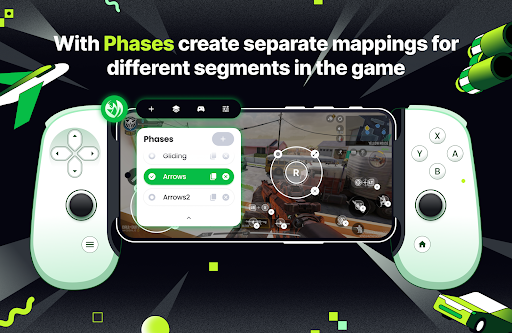
★ Phases 🌖 : Mantis gives you the ability to create different Mapping Profiles for different phases of the Games, like Movement, Driving, Parachute, Lobby etc.
★ MOBA Smart Cast Support 🧭 : With MOBA Smart Cast Feature, you can now map your MOBA Game’s directional ability using a combination of a Gamepad Button and a Thumbstick.
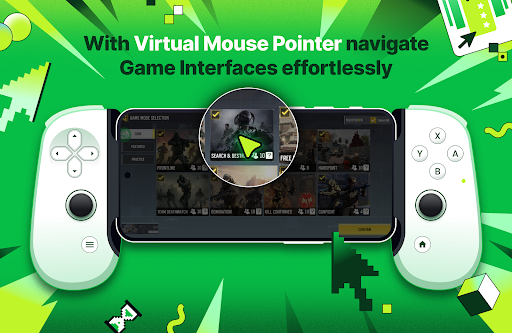
★ Virtual Mouse Mode 🖱️ : Navigating a Game’s Interface with a Gamepad has never been easier. Virtual Mouse Mode lets you control a Mouse Pointer using a Thumbstick and a Button.
★ Sequence Buttons 🔳 : With Sequence Buttons, you can map the same Gamepad Button in different places on the Screen, and touches would be registered one by one with each physical press.
★ Separate X/Y Axis Camera Sensitivity 📷 : Mantis gives you the option of changing the Vertical and Horizontal Sensitivity of your Thumbsticks separately, for better customization. Great for shooter games.
★ Incredible DPAD Support 🕹️ : Mantis allows you to use your DPAD like ThumbStick. Great for Gamepads without Physical ThumbSticks. 8-Way DPAD as buttons is also supported.
★ Smart Resume ↩️ : Mantis lets you Multitask between Gaming Sessions and will be ready with the Overlay once you return.
★ Dark Theme 🌑 : The Modern Interface & Incredible Dark Theme radiates the perfect gaming vibes while being intuitive at the same time.
★ On-Device Activation 🔒 : Activate MantisBuddy Service Instantly with the device itself using the Wireless Debugging feature of Android.
★ No C