Action Button-Voice Automation


Action Button-Voice Automation Summary
Action Button-Voice Automation is a with in-app purchases Android app in Productivity by Voice Automation. Released in Jan 2026 (1 month ago). It has about 32+ installs Based on AppGoblin estimates, it reaches roughly 5.00 monthly active users and generates around $<10K monthly revenue (100% IAP / 0% ads). Store metadata: updated Mar 6, 2026.
Recent activity: 1.00 installs this week (7.00 over 4 weeks) View trends →
Store info: Last updated on Google Play on Mar 6, 2026 .
0★
Ratings: 0
Screenshots



App Description
Voice recorder with webhook. Record audio on locked screen. Send to AI & n8n
Voice Recorder with Webhook Integration - Record Audio Even on Locked Screen
Record voice hands-free using your volume buttons, even when your phone is locked. Audio is automatically sent to your webhook endpoint for AI processing, transcription, or automation.
🔒 WORKS ON LOCKED SCREEN
Record audio without unlocking your phone. Perfect for driving, walking, or quick voice capture. The accessibility service keeps volume buttons responsive even with screen off.
🎯 HOW IT WORKS
Long-press volume up or down to start recording. Long-press again to stop. Your audio recording is automatically sent to your configured webhook URL.
⚡ KEY FEATURES
• Hands-Free Voice Recorder
- Record with volume buttons - no touch screen needed
- Works in background, locked screen, or screen off
- Two independent channels (Volume Up + Volume Down)
- Normal volume control works with short press
• Webhook Audio Sender
- Send audio recordings to any HTTP endpoint (POST, PUT, PATCH)
- Receive and auto-play audio responses from AI
- Configurable timeout and HTTP methods
• Smart Recording Protection
- High-quality AAC audio (128kbps, 44.1kHz)
- Auto-stop and extension prompts for long recordings
- All recordings stored locally - delete anytime
🔗 INTEGRATIONS
Works with popular automation platforms:
• n8n - Send voice recordings to n8n workflows
• Make.com (Integromat) - Voice to automation
• Zapier - Voice triggered zaps
• Home Assistant - Voice control for smart home
• Custom webhooks - Any HTTP endpoint
🤖 AI VOICE ASSISTANT USE CASES
• ChatGPT / OpenAI - Send voice, receive AI audio response
• Claude AI - Voice conversation with Claude
• Whisper API - Automatic speech-to-text transcription
• Custom AI - Any voice-to-text or voice-to-voice API
📱 USE CASES
• Voice Notes While Driving - Hands-free voice memo capture
• Voice Journal - Quick audio logging to your cloud
• Smart Home Voice Control - Trigger automations with voice
• Voice Transcription - Send to transcription services
• AI Voice Chat - Two-way voice conversations with AI
• Accessibility - Voice recording for users with mobility needs
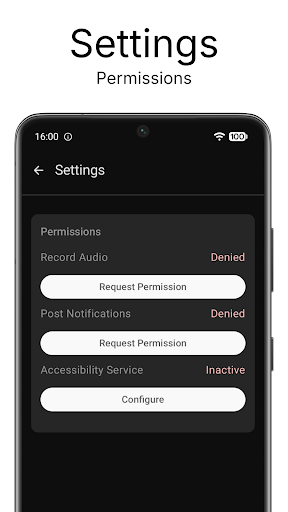
🔒 PRIVACY & PERMISSIONS
Required permissions:
- Microphone: Record your voice
- Internet: Send recordings to webhooks
- Accessibility Service: Detect volume button presses (see below)
- Notifications: Show recording status
♿ ACCESSIBILITY SERVICE DATA USE:
This app uses the Android Accessibility Service to detect volume button long-presses for hands-free voice recording on locked screen. Key events are processed in real-time only - never stored, logged, or transmitted. The service does NOT read screen content, monitor user activity, or interact with other apps. Disable anytime in Android Settings > Accessibility.
📱 SIMPLE SETUP
1. Enable accessibility service (one-time)
2. Enter your webhook URL
3. Long-press volume button to record
4. Long-press again to send - done!
💎 PRICING
Free: 10 webhook sends/month (unlimited local recording)
Premium: Unlimited sends - monthly or yearly
7-day free trial • Cancel anytime
Transform your Android into a voice automation powerhouse. Download the best voice recorder with webhook integration!