Speed Status - Status Saver


Speed Status - Status Saver Summary
Speed Status - Status Saver is a ad-supported, with in-app purchases Android app in Tools by Manoj Pedvi. Released in May 2020 (5 years ago). It has about 480+ installs and 15 ratings . Based on AppGoblin estimates, it reaches roughly 18 monthly active users and generates around $<10K monthly revenue (44% IAP / 56% ads). Store metadata: updated Jul 13, 2025.
Recent activity: 2.00 installs this week (5.00 over 4 weeks) showing steady growth View trends →
Store info: Last updated on Google Play on Jul 13, 2025 .
0★
Ratings: 15
Screenshots


App Description
WhatsApp status saver & downloader to download & save WhatsApp status forever 🚀
WhatsApp has become an integral part of our lives, with millions of people using it to communicate with their friends and family. One of the features that users love about WhatsApp is the ability to post a status update. WhatsApp status updates can be photos, videos, or text, and they only last for 24 hours. That's why it's important to have an app that can save WhatsApp status updates before they disappear.
## What is the Speed Status - Status Saver?
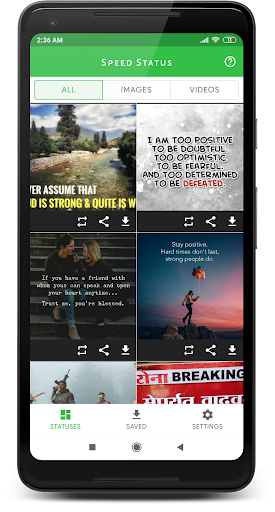
Speed Status - Status Saver is a simple app that allows users to save WhatsApp status updates. It's easy to use, and anyone can install it on their Android device and save WhatsApp statuses.
## How Does Speed Status - Status Saver Work?
The app works by accessing the WhatsApp folder on your Android device. When you view a status update on WhatsApp, it's saved temporarily in a folder on your device. The Android App to Save WhatsApp Status accesses this folder and saves the status update to your device's gallery.
## How to Use the App
Using the Speed Status - Status Saver to Save WhatsApp Status is easy. Here's how to do it:
1. Install the app from the Google Play Store
2. Open WhatsApp and view the status update you want to save
3. Open the Speed Status - Status Saver App to Save WhatsApp Status
4. The app will automatically detect the viewed status updates
5. Click save to save it to your device's gallery
If you find Speed Status - WhatsApp Status Saver & Downloader helpful for you, please rate us 🌟🌟🌟🌟🌟
If you have any questions or suggestions, please email us at jr.developer200@gmail.com
We hope you enjoy using the Speed Status - WhatsApp Status Saver & Downloader. Have a great day, Cheers!