CW Morse code iambic No Flash

CW Morse code iambic No Flash Summary
CW Morse code iambic No Flash is a mobile Android app in Education by KG9E. Released in Sep 2025 (6 months ago). It has about 2.00+ installs Store metadata: updated Mar 7, 2026.
Store info: Last updated on Google Play on Mar 7, 2026 .
0★
Ratings: 0
Screenshots



App Description
CW Morse code iambic practice oscillator without Flashlight feature
No ads, nags, or in-app purchases. No internet connection required. Fully functional offline Morse code practice app, without flash feature for compatibility with devices lacking a flashlight or camera.
For flashlight support, please see:
https://play.google.com/store/apps/details?id=appinventor.ai_izzybella419.MorseCodePracticeOscillatorHorizontalLeverCW
Certain settings on your Android device will curtail the sensitivity and performance of this app and should be turned OFF during its use. Default settings are recommended.
Two examples are Tap Duration and Ignore Repeated Touches (Settings > Accessibility > Interaction and Dexterity > Tap Duration/Ignore Repeated Touches).
This Amateur ham radio software app for Android devices allows you to practice sending Morse code with an iambic paddle practice oscillator. This Android app DOES NOT connect to your ham radio to provide a keying device.
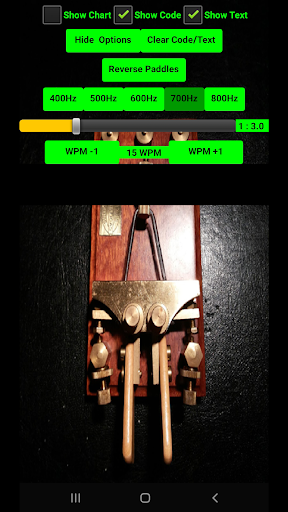
Practice sending Morse code with an iambic paddle oscillator. Simply touch down on the DIT and DAH paddles instead of pinching, squeezing, or flinging the paddles.
Settings include WPM, CW weight ratio, reverse paddles, show/hide Morse code/text, choose sidetone 400Hz-800Hz.
Touch and hold both paddles to cycle between DIT and DAH and feel the iambic rhythm.
This iambic practice oscillator app translates International Morse code into Latin letters, Arabic numerals, punctuation, CW prosigns and characters á, ch, é, ñ, ö, and ü in real time as you practice.
Here is a brief instruction on using an iambic paddle key to send Morse code:
https://www.kg9e.net/apps/AmateurHamRadioPracticeKeys/IambicKey.htm
Press and hold the Clear Code/Text button to adjust CW and Text label font sizes.
This app may be of interest to amateur ham radio QRP and QRO operators and CW, Morse code or telegraph enthusiasts, and preppers.