Applore Assistant - PRO


Applore Assistant - PRO Summary
Applore Assistant - PRO is a mobile Android app in Tools by GTS Infosoft. Released in Oct 2019 (6 years ago). It has about 1.7K+ installs and 109 ratings with a 4.60★ (excellent) average. Based on AppGoblin estimates, it reaches roughly 59 monthly active users . Store metadata: updated Mar 10, 2026.
Recent activity: 3.00 installs this week (5.00 over 4 weeks) showing steady growth View trends →
Store info: Last updated on Google Play on Mar 10, 2026 .
4.6★
Ratings: 109
Screenshots



App Description
Device manager for your security, privacy and& mental well-being.
Full-featured premium version of Applore.
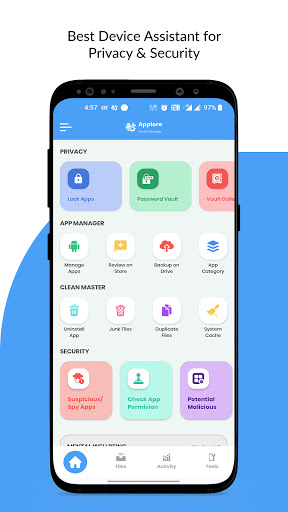
Applore Device Manager Essential tool that protects your device from malicious, spy apps, unauthorized access & pickpocketing. It keeps your phone clean, locks important apps, stores private media in the vault, removes junk space, fixes duplicate files/contacts, deletes cache, uninstalls bulk apps, improves speed & battery, hides/disables apps, backup/restore app/contact and more!!
Privacy & Security: Find Suspicious apps, Hidden apps, Unsafe apps
File Privacy: Hide any Picture, Video, Audio, or Document files from the file system.
Mental Wellbeing: Keep yourself away from phone addiction with Focus mode.
Anti-Theft support: Save from pickpocketing, pick from charging, and more.
App Lock: AppLock, WifiLock, Notification Lock
Manage apps: BulkUninstall, cache, size, settings
File Manager: Daily media view, file finder, explore, file, unzip, move file, recent file
Duplicate finder: duplicate image, claim memory
Junk files finder: Unwanted files and thumbnails
Uninstallation & Backup: Bulk Uninstall, and backup apps
Share Apps and files: Send app link and APK to friends
App update notification: App updates finder
Insight of your phone: Total information about hardware condition
Social app management: WhatsApp and Facebook status files, distribution of files
Password Manager: Create a random password, and auto-fill using passlock.
Contact: Backup and share contact data access phone.
File manager
Manage your files and folders as you do on the desktop. search, copy, cut, paste, delete, move, rename, share, send, file property, and more.
compress and decompress files
Search and share files
Multiple select, copy, cut, and delete files
Find a file by category, size, file type
Picture and video preview thumbnail.
Everyday new file report.
App Lock
Lock individual or group of apps protected with passlock and pattern, Wi-Fi, Bluetooth, and Data
Advance lock with PIN, Pattern, and FingerTouch
Lock Private Notification and System settings
Optimize to use minimum phone battery
App Manager
The best tool to find insight into installed and System applications. Find the latest, large memory, high cache memory apps and decide to bulk delete unimportant apps. Apps can be backed up and restored from Google Drive Cloud, send/share APK files, check permissions used by the app, and hide/disable system applications.
Private Media Vault
Move your Gallery picture video to the private vault that encrypts your files and stores them locally. These files can only be viewed if you have access to a passcode or pattern.
Mental wellbeing
Save yourself or your kids from phone addiction. Set up the maximum time that you want to restrict per day, once that time is over then access to that app will be locked for the rest of the day. Super Focus mode allows you to instantly lock these distracting apps for a given time period.
Anti Theft Device tools
The app offers four distinct tools to save your phone from theft. The pick-pocketing ensures that the phone rings an alarm as soon as it is out of your pocket, while charger protection rings the phone as and when someone disconnects. You need to enter passlock or pattern to stop the ring.
Applore uses the Device Administrator permission.
To enable Advanced Protection from accidental deletion, please activate "device administrator". It's only used to prevent intruders from uninstalling AppLock.
Applore uses Accessibility service.
To enable Power saving mode, please allow Accessibility services. The service is only used to reduce battery usage, improve unlocking efficiency, and ensure Applore works stable.
Applore allow user to install packages
The app offers to send or install packages from the app available locally.