Switchly


Switchly Summary
Switchly is a with in-app purchases Android app in Productivity by Saltyy. Released in Oct 2025 (5 months ago). It has about 4.5K+ installs and 61 ratings with a 4.63★ (excellent) average. Based on AppGoblin estimates, it reaches roughly 1.2K monthly active users and generates around $<10K monthly revenue (100% IAP / 0% ads). Store metadata: updated Mar 30, 2026.
Recent activity: 697 installs this week (2K over 4 weeks) showing exceptional growth , and 4.00 new ratings this week View trends →
Store info: Last updated on Google Play on Mar 30, 2026 .
4.63★
Ratings: 61
Screenshots



App Description
Create app profiles and block distractions instantly - via tap or NFC tag.
Stay focused. Stay in control.
Switchly helps you block distracting apps, manage multiple profiles, and automate your routines with one tap or an NFC tag — all without accounts, ads, or unnecessary background usage.
🚀 What Switchly Does
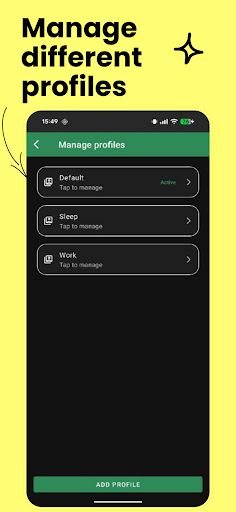
• Create multiple profiles for Work, Study, Sleep, Driving, or anything you need
• Block selected apps quickly and reliably
• NFC tag actions: toggle, activate, or deactivate instantly
• Quick Settings tile for one-tap switching
• Schedules (time/day rules) and optional Wi-Fi / Bluetooth triggers for automatic switching (Premium)
• Emergency Unlock: a temporary 15-minute bypass (once a day)
• Custom accent colours + clean Material UI (light & dark)
• Privacy-first: no accounts needed, no ads
• Optional Google Backup & Restore via the system
🔐 Accessibility Service Usage (Required for App Blocking)
To reliably block apps and enforce your active profile, Switchly uses Android’s Accessibility Service API.
Why it’s needed
Switchly uses Accessibility Service to:
• Detect which app is currently in the foreground (so blocked apps can be stopped immediately)
• Apply your active blocking rules consistently when switching apps
• Show a blocking screen / send you back when a blocked app is opened
What Switchly does NOT do
• It does not read your messages, typed text, passwords, or screen content
• It does not record audio
• It does not collect or sell personal data
• It does not share your data with third parties
All blocking and profile logic runs locally on your device.
You can disable the Accessibility Service at any time in Android Settings.
(Without it, profile switching and automation may still work, but app blocking cannot be enforced reliably.)
🎯 Perfect For
• Students & professionals who want fewer distractions
• Anyone needing a simple but powerful focus mode
• NFC automation fans (desk, car, door, notebook setups)
• Minimalists who prefer privacy-focused, local-first tools
• Parents wanting quick local app restrictions
Switchly keeps distractions away so you can focus on what matters — your time, your control, your flow.