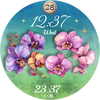
WB Flower Garden Watch Face

ASO Keyword Dashboard
Tracking 134 keywords for WB Flower Garden Watch Face in Google Play
WB Flower Garden Watch Face tracks 134 keywords (no keywords rank yet; 134 need traction). Key metrics: opportunity 70.5, difficulty 47.1.
Elegant Flower Watch Face: 190+ Stunning Floral Styles for Women
Tracked keywords
134
0 ranked • 134 not ranking yet
Top 10 coverage
—
Best rank — • Latest leader —
Avg opportunity
70.5
Top keyword: versatile
Avg difficulty
47.1
Lower scores indicate easier wins
Opportunity leaders
- 63.6
versatile
Opportunity: 75.0 • Difficulty: 41.6 • Rank —
Competitors: 671
- 65.4
women
Opportunity: 74.0 • Difficulty: 41.4 • Rank —
Competitors: 620
- 63.4
minimalist
Opportunity: 74.0 • Difficulty: 39.9 • Rank —
Competitors: 255
- 64.5
aesthetic
Opportunity: 74.0 • Difficulty: 42.0 • Rank —
Competitors: 515
- 66.2
pop
Opportunity: 74.0 • Difficulty: 47.6 • Rank —
Competitors: 1,241
Unranked opportunities
versatile
Opportunity: 75.0 • Difficulty: 41.6 • Competitors: 671
women
Opportunity: 74.0 • Difficulty: 41.4 • Competitors: 620
minimalist
Opportunity: 74.0 • Difficulty: 39.9 • Competitors: 255
aesthetic
Opportunity: 74.0 • Difficulty: 42.0 • Competitors: 515
pop
Opportunity: 74.0 • Difficulty: 47.6 • Competitors: 1,241
High competition keywords
find
Total apps: 310,056 • Major competitors: 17,818
Latest rank: — • Difficulty: 58.3
enjoy
Total apps: 283,460 • Major competitors: 20,301
Latest rank: — • Difficulty: 57.4
play
Total apps: 209,600 • Major competitors: 20,433
Latest rank: — • Difficulty: 59.7
create
Total apps: 204,368 • Major competitors: 14,592
Latest rank: — • Difficulty: 59.4
different
Total apps: 189,128 • Major competitors: 15,096
Latest rank: — • Difficulty: 56.5
All tracked keywords
Includes opportunity, difficulty, rankings and competitor benchmarks
| Major Competitors | |||||||
|---|---|---|---|---|---|---|---|
| play | 66 | 100 | 60 | 85 209,600 competing apps Median installs: 7,161 Avg rating: 4.0 | — | — | 20,433 major competitor apps |
| customization | 73 | 100 | 45 | 68 17,905 competing apps Median installs: 4,207 Avg rating: 4.1 | — | — | 1,253 major competitor apps |
| mode | 69 | 100 | 56 | 77 70,041 competing apps Median installs: 5,211 Avg rating: 4.0 | — | — | 5,832 major competitor apps |
| single | 69 | 100 | 51 | 78 76,324 competing apps Median installs: 2,299 Avg rating: 4.0 | — | — | 4,309 major competitor apps |
| enjoy | 65 | 100 | 57 | 87 283,460 competing apps Median installs: 3,485 Avg rating: 4.0 | — | — | 20,301 major competitor apps |
| order | 67 | 100 | 52 | 82 142,884 competing apps Median installs: 564 Avg rating: 4.1 | — | — | 4,324 major competitor apps |
| try | 69 | 100 | 56 | 78 80,491 competing apps Median installs: 6,977 Avg rating: 4.0 | — | — | 7,923 major competitor apps |
| phone | 67 | 100 | 60 | 83 153,671 competing apps Median installs: 3,558 Avg rating: 4.0 | — | — | 9,548 major competitor apps |
| heart | 70 | 100 | 47 | 74 43,067 competing apps Median installs: 1,026 Avg rating: 4.1 | — | — | 1,625 major competitor apps |
| wear | 71 | 100 | 61 | 72 32,857 competing apps Median installs: 382 Avg rating: 4.1 | — | — | 871 major competitor apps |
| design | 68 | 100 | 52 | 80 100,695 competing apps Median installs: 1,971 Avg rating: 4.1 | — | — | 4,933 major competitor apps |
| control | 67 | 100 | 54 | 82 137,706 competing apps Median installs: 1,853 Avg rating: 3.8 | — | — | 7,582 major competitor apps |
| people | 68 | 100 | 54 | 80 104,501 competing apps Median installs: 2,901 Avg rating: 4.0 | — | — | 5,798 major competitor apps |
| find | 65 | 100 | 58 | 87 310,056 competing apps Median installs: 2,793 Avg rating: 4.1 | — | — | 17,818 major competitor apps |
| women | 74 | 100 | 41 | 65 12,774 competing apps Median installs: 3,684 Avg rating: 4.1 | — | — | 620 major competitor apps |
| option | 70 | 100 | 50 | 74 47,671 competing apps Median installs: 3,040 Avg rating: 4.1 | — | — | 2,540 major competitor apps |
| complication | 73 | 100 | 64 | 58 4,491 competing apps Median installs: 375 Avg rating: 4.3 | — | — | 34 major competitor apps |
| key | 68 | 100 | 52 | 81 124,111 competing apps Median installs: 1,385 Avg rating: 4.0 | — | — | 5,949 major competitor apps |
| swipe | 72 | 100 | 49 | 69 22,791 competing apps Median installs: 4,148 Avg rating: 4.1 | — | — | 1,666 major competitor apps |
| note | 71 | 100 | 48 | 72 32,187 competing apps Median installs: 4,198 Avg rating: 4.1 | — | — | 1,695 major competitor apps |
| process | 70 | 100 | 48 | 76 57,128 competing apps Median installs: 1,005 Avg rating: 3.9 | — | — | 1,940 major competitor apps |
| touch | 69 | 100 | 52 | 76 63,582 competing apps Median installs: 1,860 Avg rating: 4.0 | — | — | 3,758 major competitor apps |
| account | 68 | 100 | 54 | 79 94,938 competing apps Median installs: 2,055 Avg rating: 3.9 | — | — | 5,001 major competitor apps |
| masterpiece | 73 | 100 | 40 | 57 3,596 competing apps Median installs: 5,801 Avg rating: 4.1 | — | — | 324 major competitor apps |
| install | 70 | 100 | 49 | 76 59,565 competing apps Median installs: 3,189 Avg rating: 4.1 | — | — | 2,866 major competitor apps |
App Description
Elegant Flower Watch Face: 190+ Stunning Floral Styles for Women
Transform your smartwatch into a blooming masterpiece with Floral Garden – the ultimate aesthetic watch face (Wear OS) for women who love elegance and variety.
_____
✨ How to Personalize
1. Enter Customization Mode Simply tap and hold the watch screen, then tap the Customise button.
2. Mix & Match Your Look
- Swipe to choose from 19 backgrounds.
- Select your favorite from 10 unique flower sets.
- Tap the complication slot to choose the data you want to see (Weather, Steps, Battery, etc.).
3. Switching Between Background Sets
- Go to the Second Background Set in the menu.
- Select the very first option (at the top) to reset it.
- Now you can freely select any background from the First Set.
_____
Why settle for one design when you can have 200? Floral Garden is not just a watch face. It’s a versatile accessory designed to match your mood, your outfit, and your lifestyle. Whether you are looking for a mysterious, dark floral aesthetic for a night out or a bright, cheerful burst of colors for a sunny day, this watch face offers it all.
🌸 190 Stunning Combinations
Unlock endless creativity with our unique mix-and-match system. Choose from:
- 19 Exquisite Backgrounds: From deep, midnight tones that make the colors pop to light, airy textures for a fresh look.
- 10 Beautiful Flower Stickers: Featuring hand-picked botanical favorites including Roses, Orchids, Daisies, Sunflowers, Daffodils,Pansies, Anemones, Cosmos, and Camellias.
✨ Elegant & Minimalist Design
We believe in beauty through simplicity. Floral Garden focuses on aesthetic pleasure rather than cluttered data. It features:
- Artistic Typography: A beautiful, custom font for the time that adds a touch of class.
- Essential Info at a Glance: Clearly displays the Hour, Date, and Day of the week.
- Customisable Complication: One editable slot to add exactly what you need—be it your heart rate, weather, steps, or battery level.
👗 A Staple for Every Outfit
With 190 different looks, this is the only floral watch face you’ll ever need. It’s a true wardrobe staple. The high-contrast dark modes create a magical, glowing effect, while the vibrant light themes bring joy to your daily routine.
🌿 Key Features:
- 190 Floral Looks
- 10 Unique AOD Styles
- Elegant & Feminine Aesthetic
- 1 Customisable Complication (Long press to edit)
- High-Resolution Botanical Art
_______
ⓘ Installation
How to install: https://watchbase.store/static/ai/
After installation: https://watchbase.store/static/ai/ai.html
If you have any issues installing the watch face, please note that we have no control over the installation process or any other Google Play / Watch processes. The most common issue that people face is after they buy the watch face and install it, they can't see/find it.
In order to apply the watch face after you install it, touch and hold on the main screen (your current watch face) the swipe left to look for it. If you can't see it, tap on the " + " sign at the end (add a watch face) and find our watch face there.
We use a companion app for the phone to make the installation process easier. If you buy our watch face, tap on the install button (on the phone app) you must check your watch.. a screen will appear with the watch face.. tap install again and wait for the installation to finish. If you already bought the watch face and it still asks you to buy it again on the watch, don't worry you will not be charged twice. This is a common synchronisation issue, just wait a little or try to restart your watch.
Another solution for installing the watch face is to try to install it from a browser, logged with your account (Google Play account that you use on the watch).
_____
JOIN WatchBase.
Facebook:
https://www.facebook.com/WatchBase
Instagram:
https://www.instagram.com/watch.base/
YouTube:
https://www.youtube.com/c/WATCHBASE