Cast to Chromecast, Roku, & TV

Cast to Chromecast, Roku, & TV Summary
Cast to Chromecast, Roku, & TV is a ad-supported, with in-app purchases Android app in Tools by EAGLE APPS. Released in Apr 2024 (2 years ago). It has about 654K+ installs and 277 ratings with a 3.73★ (average) average. Based on AppGoblin estimates, it reaches roughly 42.8K monthly active users and generates around $<10K monthly revenue (55% IAP / 45% ads). Store metadata: updated Jun 11, 2026.
Recent activity: 8.3K installs this week (26.8K over 4 weeks) showing declining growth , and 8.00 new ratings this week View trends →
Store info: Last updated on Google Play on Jun 11, 2026 .
3.73★
Ratings: 277
Screenshots


App Description
Easily cast Images & Videos to Chromecast, Roku or smart TVs.
Watch every moment on the big screen with Cast to Chromecast, Roku & TV. Easily cast videos, photos, web content, and live sports from your phone to Chromecast, Roku, Fire TV, and other Smart TVs. Enjoy smooth screen mirroring and fast TV casting for entertainment, streaming, and everyday viewing.
Whether you're watching live matches, highlights, movies, or sharing memories with family, Cast to TV makes connecting your phone to your TV simple, fast, and reliable.
Cast Videos and Live Sports to TV
Enjoy your favorite matches, videos, and online content on a larger screen. Stream web videos and media with smooth playback and high-quality casting.
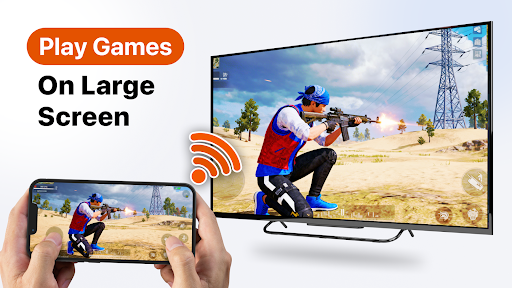
Screen Mirroring with Low Latency
Mirror your phone screen to your TV in real time. Perfect for watching sports, presentations, fitness sessions, browsing, or sharing content with friends and family.
Cast Photos and Videos
Display photos and videos from your device directly on your TV. Create memorable slideshows or enjoy your favorite moments on the big screen.
Supports Popular Streaming Devices
• Chromecast devices
• Roku TV and Roku streaming players
• Fire TV devices
• Android TV
• Smart TVs with wireless display support
• Miracast-enabled TVs
Built-in Remote Control
Control playback directly from your phone. Play, pause, seek, adjust volume, and manage your content with ease. Personalize the remote interface for a better experience.
Fast and Easy Setup
Getting started is simple:
• Connect your phone and TV to the same Wi-Fi network.
• Enable wireless display or screen mirroring on your TV.
• Open Cast to Chromecast, Roku & TV.
• Select your device and start casting within seconds.
Main Features
✓ Cast videos to TV
✓ Screen mirroring with audio
✓ Cast photos and music
✓ Stream web videos
✓ Phone to TV connection
✓ Smart TV casting
✓ Chromecast support
✓ Roku TV support
✓ Fire TV support
✓ Easy device discovery
✓ Smooth and stable connection
✓ User-friendly interface
Free Features
• Basic screen mirroring
• Cast local photos and videos
• Stream music and audio files
• Connect phone to TV easily
Premium Features
• Unlimited web video casting
• Ad-free experience
• Access to all premium tools
• IP address blocking feature
• Priority customer support
Perfect for Match Days and Everyday Streaming
Enjoy live games, highlights, movies, TV shows, family videos, and online content on a bigger screen. Turn your phone into a powerful TV companion and experience seamless streaming anytime.
Why Choose Cast to Chromecast, Roku & TV?
• Fast connection
• Stable casting performance
• High-quality screen mirroring
• Support for multiple TV devices
• Easy setup and intuitive controls
• Reliable streaming experience
Download Cast to Chromecast, Roku & TV today and enjoy a smarter way to watch videos, stream live content, and share your favorite moments on the big screen.
DISCLAIMER: Cast to Chromecast, Roku & TV is an independent application and is not affiliated with or endorsed by Google, Roku, Amazon, or any television manufacturer. All trademarks belong to their respective owners.
Need help? Contact us at globaleagleapps@gmail.com.