PassSecurium Password Manager


PassSecurium Password Manager Summary
PassSecurium Password Manager is a mobile Android app in Tools by ALPEIN Software SWISS AG. Released in Dec 2016 (9 years ago). It has about 2.2K+ installs and 43 ratings with a 4.80★ (excellent) average. Based on AppGoblin estimates, it reaches roughly 189 monthly active users . Store metadata: updated Mar 30, 2026.
Recent activity: 58 installs this week (201 over 4 weeks) showing exceptional growth View trends →
Store info: Last updated on Google Play on Mar 30, 2026 .
4.8★
Ratings: 43
Screenshots


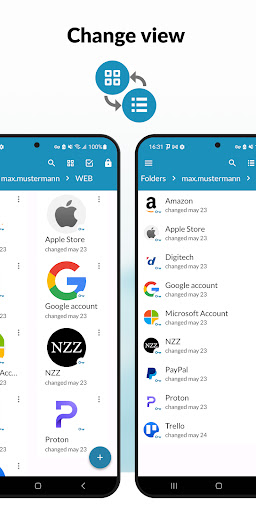
App Description
PassSecurium is a Swiss made password manager for businesses and individuals.
With PassSecurium you can access your password vault, and manage passwords securely and conveniently. Besides standard functions (create / view / edit / delete passwords) PassSecurium offers an integrated password generator with selectable complexity.
Key functions of our password manager for individuals:
🔹 Create, view, edit and delete passwords
🔹 Password templates (web account, credit card, ID card, etc.)
🔹 Quick menu to copy login / password
🔹 Autofill feature
🔹 Integrated password generator with selectable complexity
🔹 Fingerprint/face unlock
🔹 Auto-lock on inactivity (customizable)
🔹 Offline mode support
🔹 Multi account - effortless switch between accounts, personal, professional or otherwise
🔹 Mobile & web access
🔹 Folder management (starting from Standard subscription: https://www.pass-securium.ch/en/prices/)
🔹 Change history, restoring of deleted items (PassSecurium™ Standard)
🔹 Password export / import (PassSecurium™ Standard)
Key functions of PassSecurium for business:
🔷 All listed above + administration features:
🔷 User management
🔷 Granular user permissions
🔷 Folder & group password sharing
🔷 AD / LDAP integration, Entra ID (former Azure AD)
🔷 Access password storage through VPN
🔷 UI customization
🔷 In-house backup
🔷 Variety of customizable security settings
For convenient password handling in browsers, we recommend the PassSecurium browser extension with the following features:
🔸 Autosave: saving passwords to the PassSecurium password manager at the first login
🔸 Autofill: filling in login forms on websites
🔸 Password management through the extension
🔸 Additional PIN for login protection
Download our browser extension for:
Chrome, Brave, Opera - https://chrome.google.com/webstore/detail/passsecurium/kmmndpeiibkjhdkakihdafcodnhgflcp
Firefox - https://addons.mozilla.org/en-US/firefox/addon/passsecurium/
Edge - https://microsoftedge.microsoft.com/addons/detail/passsecurium/dpikdniicebdfngfjndckpiadbglkpje
Your password vault is synchronized between all your devices and the web version: https://app.pass-securium.ch/login
Passwords are stored in an encrypted form both on the devices and in isolated containers in the modern data center in Switzerland.
All your data is protected by the Swiss law, which is one of the strictest in the world.
Feel free to contact our support team via email support@pass-securium.ch or directly from the app feature: Contact us.
▶️ Discover videos about the PassSecurium password manager on our YouTube cannel: https://www.youtube.com/watch?v=yW8M0HKH5ZI&list=PLQbb1QnMjARGeXzVkdK1JuLSCelfLpwX0