OneNotify Notification Manager


OneNotify Notification Manager Summary
OneNotify Notification Manager is a with in-app purchases Android app in Tools by SkyRiN Apps. It has about 1.5K+ installs Based on AppGoblin estimates, it reaches roughly 163 monthly active users and generates around $<10K monthly revenue (100% IAP / 0% ads). Store metadata: updated Jan 1, 2026.
Recent activity: 38 installs this week (170 over 4 weeks) showing steady growth View trends →
Store info: Last updated on Google Play on Jan 1, 2026 .
0★
Ratings: 0
Screenshots



App Description
Android notification manager & filter box—catch what matters, mute the rest
Tired of drowning in Android notifications?
OneNotify is the all-in-one notification app that saves, filters, and organises every alert so you never miss the important stuff again.
──────────────────────────────────
Why choose OneNotify?
──────────────────────────────────
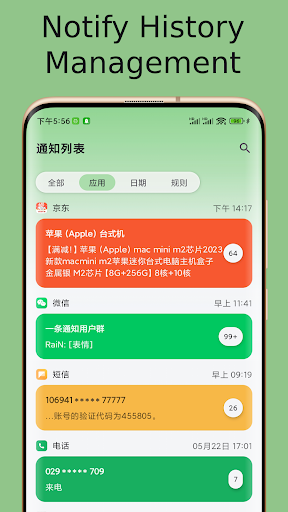
Notification Manager & History
See a complete timeline of every Android notification—even the ones you swiped away too fast.
Powerful Filter Box
Auto-silence spam with rule-based keyword, app, or channel filters. Create custom filter boxes for work, social, shopping, or any scenario.
Focus Friendly
Schedule quiet hours or use one-tap Focus Mode to pause noisy apps without missing priority alerts.
Lightweight & Private
No ads, no analytics. All data stays on-device in encrypted storage.
Fully Customisable
Choose icon styles, colour themes, and vibration patterns. Power users can export logs to CSV.
──────────────────────────────────
Key features at a glance
──────────────────────────────────
• Smart Categories — automatically tags alerts (messages, promos, system, downloads)
• Per-app Channels — treat each chat group or email inbox differently
• Quick Actions — reply, archive, or share right inside the notification
• Backup & Restore — one-tap Google Drive sync keeps your history safe
──────────────────────────────────
How this filter app works
──────────────────────────────────
1. A granular notification listener captures incoming alerts.
2. The rules engine scans titles, text, and package name.
3. Matched items are stored in a local SQLite log and routed to the right filter box.
4. A clean summary card appears—no more cluttered status bar!
──────────────────────────────────
Who uses OneNotify?
──────────────────────────────────
• Busy professionals juggling dozens of chat apps.
• Students who want a distraction-free study session.
• Power users migrating from legacy solutions like Notification History Log or FilterBox.
──────────────────────────────────
What users say
──────────────────────────────────
“Exactly the notification manager Android should ship with.” — Alex
“Finally a filter app that doesn’t drain battery.” — Mina
──────────────────────────────────
Get started
──────────────────────────────────
1. Install and grant Notification permission.
2. Tap “Create Filter Box”, then pick apps or keywords.
3. Enjoy a calmer, cleaner phone.
Download OneNotify today and take back control of your Android notifications!