BFF29- Technology Body & Heart
ASO Keyword Dashboard
Tracking 158 keywords for BFF29- Technology Body & Heart in Google Play

BFF29- Technology Body & Heart tracks 158 keywords (no keywords rank yet; 158 need traction). Key metrics: opportunity 64.8, difficulty 50.6.
Animation Technology for Wear OS by BFF-Storm (Except for the square watch face)
Tracked keywords
158
0 ranked • 158 not ranking yet
Top 10 coverage
—
Best rank — • Latest leader —
Avg opportunity
64.8
Top keyword: make sure
Avg difficulty
50.6
Lower scores indicate easier wins
Opportunity leaders
- 68.5
make sure
Opportunity: 73.0 • Difficulty: 55.3 • Rank —
Competitors: 1,710
- 68.3
currently
Opportunity: 73.0 • Difficulty: 50.8 • Rank —
Competitors: 877
- 68.6
icon
Opportunity: 73.0 • Difficulty: 55.3 • Rank —
Competitors: 1,128
- 68.3
customized
Opportunity: 73.0 • Difficulty: 51.9 • Rank —
Competitors: 1,234
- 68.7
installed
Opportunity: 73.0 • Difficulty: 61.6 • Rank —
Competitors: 1,076
Unranked opportunities
make sure
Opportunity: 73.0 • Difficulty: 55.3 • Competitors: 1,710
currently
Opportunity: 73.0 • Difficulty: 50.8 • Competitors: 877
icon
Opportunity: 73.0 • Difficulty: 55.3 • Competitors: 1,128
customized
Opportunity: 73.0 • Difficulty: 51.9 • Competitors: 1,234
installed
Opportunity: 73.0 • Difficulty: 61.6 • Competitors: 1,076
High competition keywords
new
Total apps: 193,474 • Major competitors: 25,823
Latest rank: — • Difficulty: 65.7
free
Total apps: 173,844 • Major competitors: 23,343
Latest rank: — • Difficulty: 64.4
time
Total apps: 170,577 • Major competitors: 19,592
Latest rank: — • Difficulty: 64.6
make
Total apps: 163,352 • Major competitors: 21,922
Latest rank: — • Difficulty: 65.0
features
Total apps: 116,743 • Major competitors: 14,116
Latest rank: — • Difficulty: 64.6
All tracked keywords
Includes opportunity, difficulty, rankings and competitor benchmarks
| Major Competitors | |||||||
|---|---|---|---|---|---|---|---|
| free | 64 | 100 | 64 | 90 173,844 competing apps Median installs: 46,597 Avg rating: 3.1 | — | — | 23,343 major competitor apps |
| play | 65 | 100 | 67 | 86 113,236 competing apps Median installs: 62,750 Avg rating: 3.2 | — | — | 19,366 major competitor apps |
| new | 64 | 100 | 66 | 90 193,474 competing apps Median installs: 42,470 Avg rating: 3.0 | — | — | 25,823 major competitor apps |
| level | 68 | 100 | 60 | 80 47,860 competing apps Median installs: 42,032 Avg rating: 3.1 | — | — | 6,533 major competitor apps |
| health | 70 | 100 | 52 | 75 23,713 competing apps Median installs: 25,526 Avg rating: 2.7 | — | — | 1,845 major competitor apps |
| page | 72 | 100 | 52 | 71 13,904 competing apps Median installs: 37,180 Avg rating: 2.9 | — | — | 1,547 major competitor apps |
| right | 67 | 100 | 66 | 83 68,533 competing apps Median installs: 35,866 Avg rating: 3.0 | — | — | 8,317 major competitor apps |
| try | 68 | 100 | 62 | 79 44,524 competing apps Median installs: 62,670 Avg rating: 3.2 | — | — | 7,600 major competitor apps |
| make | 64 | 100 | 65 | 89 163,352 competing apps Median installs: 42,108 Avg rating: 3.0 | — | — | 21,922 major competitor apps |
| phone | 67 | 100 | 69 | 83 75,756 competing apps Median installs: 37,780 Avg rating: 3.0 | — | — | 9,010 major competitor apps |
| via | 68 | 100 | 58 | 81 54,601 competing apps Median installs: 29,805 Avg rating: 2.7 | — | — | 5,243 major competitor apps |
| connected | 70 | 100 | 56 | 74 22,704 competing apps Median installs: 25,700 Avg rating: 2.8 | — | — | 2,181 major competitor apps |
| step | 69 | 100 | 55 | 77 31,345 competing apps Median installs: 35,708 Avg rating: 2.9 | — | — | 3,571 major competitor apps |
| support | 67 | 100 | 60 | 83 68,575 competing apps Median installs: 34,249 Avg rating: 3.0 | — | — | 7,371 major competitor apps |
| contact | 67 | 100 | 58 | 82 58,884 competing apps Median installs: 30,986 Avg rating: 2.8 | — | — | 5,729 major competitor apps |
| section | 72 | 100 | 50 | 70 12,915 competing apps Median installs: 29,599 Avg rating: 2.8 | — | — | 1,080 major competitor apps |
| heart | 71 | 100 | 50 | 71 15,090 competing apps Median installs: 29,042 Avg rating: 2.9 | — | — | 1,461 major competitor apps |
| wear | 72 | 100 | 80 | 66 7,173 competing apps Median installs: 24,222 Avg rating: 3.2 | — | — | 839 major competitor apps |
| wear os | 71 | 100 | 76 | 60 3,443 competing apps Median installs: 13,088 Avg rating: 3.5 | — | — | 279 major competitor apps |
| image | 70 | 100 | 54 | 76 27,195 competing apps Median installs: 35,290 Avg rating: 2.8 | — | — | 3,073 major competitor apps |
| avoid | 71 | 100 | 61 | 72 16,708 competing apps Median installs: 44,275 Avg rating: 2.9 | — | — | 2,344 major competitor apps |
| using | 65 | 100 | 64 | 86 114,758 competing apps Median installs: 37,480 Avg rating: 2.8 | — | — | 13,323 major competitor apps |
| menu | 72 | 100 | 65 | 71 13,685 competing apps Median installs: 28,103 Avg rating: 3.0 | — | — | 1,278 major competitor apps |
| option | 70 | 100 | 53 | 75 23,307 competing apps Median installs: 32,883 Avg rating: 2.9 | — | — | 2,446 major competitor apps |
| time | 64 | 100 | 65 | 89 170,577 competing apps Median installs: 33,133 Avg rating: 2.9 | — | — | 19,592 major competitor apps |
App Description
Animation Technology for Wear OS by BFF-Storm (Except for the square watch face)
NOTE: The Watch faces sold by BFF-Storm on the Play Store are currently in the process of feature completion based on Samsung's new Wear Os Google / One UI operating system. So we are committed to update the watch face as soon as possible if a new function is completed. And when you have problems using it, you can contact us via gmail:
support@bffstormwatchface.com
We will support and answer questions 24/7.
NOTE: Make sure you have enabled all permissions from settings -> Applications.
NOTE: How to install watch face?
1 - Make sure the watch is connected to the electricity via bluetooth, open the watch face app page to install.
Open the "Install on more device" option (Triangle icon to the right of the free install or purchase button).
Turn off the settings on the phone just to set it on the watch. And do the installation.
After successful installation, a notification will be displayed on the watch, you can search the application on the watch.
If the app doesn't appear on the watch, open the Galaxy Wearable app on your phone, select watch faces and scroll down to the downloaded apps section and select watch faces to have them show up on the watch.
2 - If you have installed companion apps on your phone by mistake, you can delete them once the watch face has been installed.
3 - If you have sync problems between your phone, Play Store and watch, install watch face directly from your watch, or you can try from your PC web browser or visit our website to Search product.
This watch face supports all Wear OS devices with API Level 30+.
NOTE : Customize button:
-Tap to select app shortcut
-Tap to open the app shortcut
NOTE : You can tap the battery icon to open the Menu. And tap again if you want to back. The menu will assist you to use the shortcuts we have installed. (You can see the instructions in the picture section)
NOTE : Some features may not be available on some watches. This watch face will not apply to square face watches.
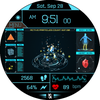
The BFF29- Technology Body & Heart by BFF-Storm.
Watch Face Features: (You can see them on the picture description)
- 12/24Hr based on phone settings
- Time information: Day, month.
- Health information: Step counts, Heart rate.
- Battery
Other customized information
- Optional color *16
- Optional Stop Animation
Always on display supports:
- The AOD screen will be fully displayed as the normal screen you have installed.
App shortcuts :
-7 customize app shortcuts. (You can see in the image description for where the 7 buttons are.)
You can see more details on our image description.
Customize :
1 - Touch and hold the screen
2 - Tap on customize option
Please visit us at:
Facebook: https://www.facebook.com/BFFKINGSTORM
Instagram: https://www.instagram.com/bffstormer/
Webpage: https://bffstormwatchface.com/
Thank You !!
