Sculpt+


Sculpt+ Summary
Sculpt+ is a with in-app purchases Android app in Art And Design by Endvoid. Released in Feb 2018 (8 years ago). It has about 2.4M+ installs and 6.5K ratings with a 3.56★ (average) average. Based on AppGoblin estimates, it reaches roughly 43.9K monthly active users and generates around $<10K monthly revenue (100% IAP / 0% ads). Store metadata: updated Mar 31, 2026, version 964.
Recent activity: 2.4K installs this week (10.3K over 4 weeks) showing steady growth , and 3.00 new ratings this week View trends →
Data tracking: SDKs and third-party integrations were last analyzed on May 9, 2026. The app's network data flows (API traffic to/from the app and its SDKs) were last crawled on Feb 15, 2026.
Store info: Last updated on Google Play on Mar 31, 2026 (version 964).
SDKs, Trackers & Permissions
Sculpt+ was last scanned for SDKs 2026-05-09. Below is the overview of third party companies detected in the app. The full list of raw SDKs, app permissions and unknown SDKs is available here.
AppGoblin saw Sculpt+ uses 1 Ad Networks
 Google
AppGoblin saw Sculpt+ uses 6 Development Tools
 JetBrains IntelliJ
 Kotlin
 Unity
UnityAppGoblin saw Sculpt+ uses 1 Analytics: Product
 Firebase
App Details
App Store
Ads & App-Ads.txt
AppGoblin SDK Scans
3.56★
Ratings: 6.5K
Screenshots
App Description
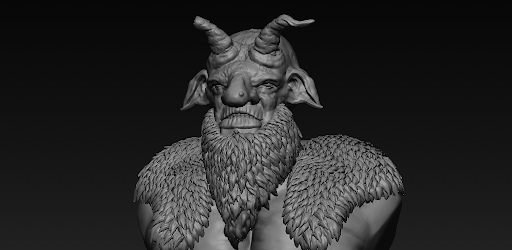
Powerful 3D modeling & painting. Sculpt characters and create 3D art on the go.
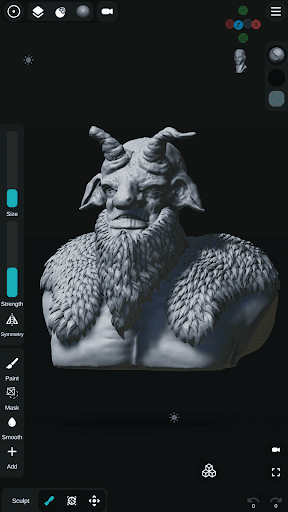
Unleash your creativity anywhere with Sculpt+, the ultimate digital 3D sculpting and painting app designed to bring desktop-level modeling tools directly to your smartphone or tablet.
Whether you are a professional 3D artist, a game developer designing characters, or a hobbyist exploring 3D printing, Sculpt+ provides a seamless, intuitive workflow for creating stunning 3D art on the go.
Build base meshes from scratch, sketch complex concepts, and detail your models with high-resolution sculpting and PBR rendering.
✨ POWERFUL SCULPTING & PAINTING
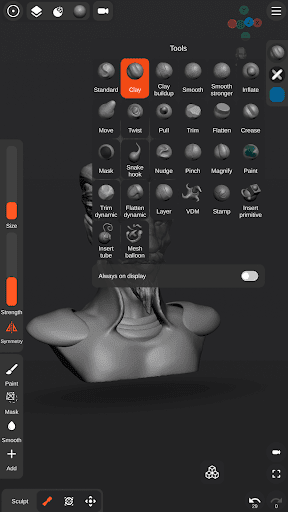
• Advanced Sculpting Brushes: Standard, Clay, Smooth, Mask, Inflate, Move, Trim, Flatten, Crease, and many more to shape your vision.
• Custom VDM Brushes: Use pre-made Vector Displacement Mesh (VDM) brushes or create your own custom brushes for intricate detailing.
• Vertex Painting: Add color, texture, and life to your 3D models with high-quality vertex painting tools.
• Stylus Support: Take full control with pressure-sensitivity support for precise brush size and strength.
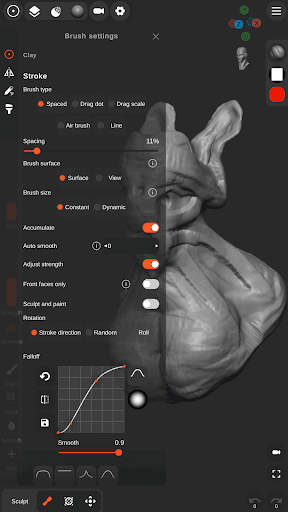
• Stroke Customization: Tweak falloff, alpha, and stroke behavior for perfect application.
🏗️ MESH BUILDING & BOOLEAN OPERATIONS
• Base Mesh Builder: Inspired by zSpheres, sketch out full-body armatures and base meshes incredibly fast.
• Voxel Remeshing & Subdivisions: Remesh your geometry instantly to maintain even topology, or subdivide for ultra-fine detailing.
• Voxel Boolean Operations: Easily combine (Union), carve out (Subtraction), or intersect meshes.
• Mesh Decimation: Optimize your polygon count for game engines or efficient 3D printing.
• Multiple Primitives: Start instantly with Spheres, Cubes, Planes, Cones, Cylinders, Torus, and pre-made sculpting base meshes.
🎨 SCENE CUSTOMIZATION & RENDERING
• PBR Rendering: Visualize your art in real-time with Physically Based Rendering.
• Dynamic Lighting: Illuminate your scene using customizable Directional, Spot, and Point lights.
• Reference Image Support: Easily import reference images directly into your workspace to guide your sculpting process.
• Customizable UI: A modern, user-friendly interface designed specifically for mobile and tablets. Customize your layout and theme to fit your workflow.
📁 IMPORT & EXPORT WORKFLOWS
• Import: Bring in 3D models (.OBJ, .STL), Custom Matcap textures, Custom Alpha textures for brushes, and HDRI textures for realistic PBR lighting.
• Export for 3D Printing & Game Engines: Export your finished projects seamlessly as .OBJ, .STL, or .GLB files.
• Share Your Art: Export high-quality Renders as JPEG or PNG (with transparent backgrounds), or generate 360-degree turntable GIFs to showcase your portfolio.
• Auto-Save Protection: Never lose your progress. Your work is automatically saved in the background so you can focus entirely on creating.
Start shaping your ideas today. Download Sculpt+ and turn your device into a portable 3D studio!