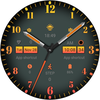

Three dials Orange

43K installs
148 ratings
611 monthly active users
Revenue not available
Install Trends
Monthly +262
Steady
Three dials Orange icon

ASO Keyword Dashboard

Tracking 78 keywords for Three dials Orange in Google Play

Developer: Design Poetry Category: personalization Rating: 3.8

Three dials Orange tracks 78 keywords (1 keyword ranks; 77 need traction). Key metrics: 0% top-10 coverage, opportunity 70.4, difficulty 48.5, best rank 21.

A diverse and stylish watch face!

Tracked keywords

78

1  ranked •  77  not ranking yet

Top 10 coverage

0%

Best rank 21 • Latest leader —

Avg opportunity

70.4

Top keyword: faces

Avg difficulty

48.5

Lower scores indicate easier wins

Opportunity leaders

  • faces

    Opportunity: 75.0 • Difficulty: 40.5 • Rank —

    Competitors: 392

    63.6
  • api

    Opportunity: 74.0 • Difficulty: 42.6 • Rank —

    Competitors: 402

    66.1
  • watch faces

    Opportunity: 74.0 • Difficulty: 36.4 • Rank —

    Competitors: 37

    60.2
  • preset

    Opportunity: 74.0 • Difficulty: 46.7 • Rank —

    Competitors: 252

    59.2
  • samsung

    Opportunity: 74.0 • Difficulty: 58.1 • Rank —

    Competitors: 676

    65.8

Unranked opportunities

  • faces

    Opportunity: 75.0 • Difficulty: 40.5 • Competitors: 392

  • api

    Opportunity: 74.0 • Difficulty: 42.6 • Competitors: 402

  • watch faces

    Opportunity: 74.0 • Difficulty: 36.4 • Competitors: 37

  • preset

    Opportunity: 74.0 • Difficulty: 46.7 • Competitors: 252

  • samsung

    Opportunity: 74.0 • Difficulty: 58.1 • Competitors: 676

High competition keywords

  • find

    Total apps: 308,533 • Major competitors: 17,760

    Latest rank: — • Difficulty: 58.4

  • like

    Total apps: 290,495 • Major competitors: 22,576

    Latest rank: — • Difficulty: 60.6

  • available

    Total apps: 200,888 • Major competitors: 10,487

    Latest rank: — • Difficulty: 58.2

  • data

    Total apps: 182,611 • Major competitors: 7,203

    Latest rank: — • Difficulty: 56.5

  • favorite

    Total apps: 171,480 • Major competitors: 11,009

    Latest rank: — • Difficulty: 59.6

All tracked keywords

Includes opportunity, difficulty, rankings and competitor benchmarks

Major Competitors
dial731003759

4,905 competing apps

Median installs: 628

Avg rating: 4.0

2121

205

major competitor apps

change681005279

90,832 competing apps

Median installs: 4,815

Avg rating: 4.0

6,398

major competitor apps

software711004972

31,589 competing apps

Median installs: 1,575

Avg rating: 3.8

1,136

major competitor apps

phone671006083

152,947 competing apps

Median installs: 3,555

Avg rating: 4.0

9,505

major competitor apps

connected691005078

74,475 competing apps

Median installs: 636

Avg rating: 4.0

2,408

major competitor apps

step691005178

84,622 competing apps

Median installs: 1,452

Avg rating: 4.0

4,171

major competitor apps

heart711004774

42,827 competing apps

Median installs: 1,012

Avg rating: 4.1

1,619

major competitor apps

wear711006172

32,740 competing apps

Median installs: 379

Avg rating: 4.1

869

major competitor apps

wear os721006070

24,398 competing apps

Median installs: 292

Avg rating: 4.2

300

major competitor apps

control671005482

136,851 competing apps

Median installs: 1,832

Avg rating: 3.8

7,550

major competitor apps

needs701004876

57,266 competing apps

Median installs: 1,280

Avg rating: 4.0

2,532

major competitor apps

list691005278

82,854 competing apps

Median installs: 2,555

Avg rating: 4.1

3,582

major competitor apps

immediately721004369

22,199 competing apps

Median installs: 3,326

Avg rating: 3.9

978

major competitor apps

find651005887

308,533 competing apps

Median installs: 2,782

Avg rating: 4.1

17,760

major competitor apps

available661005884

200,888 competing apps

Median installs: 2,598

Avg rating: 4.0

10,487

major competitor apps

api741004366

14,092 competing apps

Median installs: 474

Avg rating: 4.1

402

major competitor apps

swipe721004969

22,599 competing apps

Median installs: 4,172

Avg rating: 4.1

1,658

major competitor apps

install701004976

59,316 competing apps

Median installs: 3,185

Avg rating: 4.1

2,855

major competitor apps

watch681005780

105,069 competing apps

Median installs: 1,213

Avg rating: 4.0

5,779

major competitor apps

visit701005175

53,634 competing apps

Median installs: 2,153

Avg rating: 4.0

2,972

major competitor apps

function711004773

37,271 competing apps

Median installs: 4,212

Avg rating: 4.0

2,001

major competitor apps

galaxy731005068

18,256 competing apps

Median installs: 802

Avg rating: 4.3

673

major competitor apps

favorite671006083

171,480 competing apps

Median installs: 2,975

Avg rating: 4.1

11,009

major competitor apps

smart681005581

123,721 competing apps

Median installs: 1,750

Avg rating: 4.0

6,505

major competitor apps

many671005683

165,150 competing apps

Median installs: 5,372

Avg rating: 4.1

11,691

major competitor apps

78 keywords
1 of 4

App Description

A diverse and stylish watch face!

A diverse and stylish watch face!

Click on the background to change the three dials!

Only available on Wear OS 3+ (API 30+) devices

4 Customize app shortcuts to get your favorite data like weather, barometer, distance walked, calories and more.

Features:

- Three dials
- Sunset
- power
- heart rate
- 4 preset application shortcuts

Enter customization:

1 - Long press on the screen
2 - Click Edit

Custom tips:

You can customize any software supported by the watch, such as weather, battery, time, step count, air pressure, etc.

Note that this function needs to be set by the user and we have no control over it!

Installation options:
1. Keep the watch connected to your phone.

2. Install into your phone. Once installed, immediately press and hold the display to check the list of watch faces in your watch, then swipe to the end and click Add Watch Face. There you can see your newly installed watch face and activate it.

3. After the installation is complete, you can also check the following:

A: For Samsung watches, check the Galaxy Wearable app on your phone (install it if you haven't already). Under Watch Faces > Downloaded, you can see your newly installed watch face and apply it to your connected watch.

B. For other smart watch brands, for other Wear OS devices, please check the watch app installed in your smart watch brand phone and find the newly installed watch face in the watch face gallery or list.

4. Also visit the link below which shows many options on how to install a Wear OS watch face in your watch.
https://developer.samsung.com/sdp/blog/en-us/2022/11/15/install-watch-faces-for-galaxy-watch5-and-one-ui-watch-45