Edit Text Files TXT File Maker


Edit Text Files TXT File Maker Summary
Edit Text Files TXT File Maker is a ad-supported Android app in Productivity by Kaveri Tyagi. Released in Jan 2020 (6 years ago). It has about 267.9K+ installs and 5.6K ratings with a 4.56★ (excellent) average. Based on AppGoblin estimates, it reaches roughly 37.7K monthly active users and generates around $<10K monthly revenue (0% IAP / 100% ads). Store metadata: updated Mar 19, 2026.
Recent activity: 861 installs this week (3.1K over 4 weeks) showing steady growth , and 16 new ratings this week View trends →
Store info: Last updated on Google Play on Mar 19, 2026 .
4.56★
Ratings: 5.6K
Screenshots


App Description
Make Notepad TXT Files or Edit Text File on mobile Create File in .TXT Format
Classic Notepad to save .TXT Files like Computer:
Classic Notepad is a feature rich and Powerful Notepad app that saves .TXT Files in the same way as you used create to in Computers.
We have added all the important features of classic Text Editors in this app to make you feel like you are making TXT Format text file in your Laptop or PC.
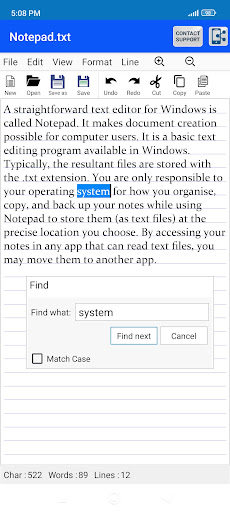
Like Classic notepad Editors, you will find Open file and New File options with Save and Save as file choices in the File menu.
There are a number of Toolbar choices including Undo or Redo functions and buttons to Perform Cut Copy Paste operations.
Text Search Function has Find word feature with Find Next option and Go to option.
App also has Insert Time and date feature and Sliders options for Zoom in Zoom out.
Editing options include Font Alignment and change text size with slider, Text Shadow feature with Font styles and Strike through options.
You choose to Show or Hide line in the notepad and change to space between horizontal lines of notepad using Line spacing feature
Select text and Word wrapping features to make the text editing easy and simple.