VoiceOver: Record & Edit Audio


VoiceOver: Record & Edit Audio Summary
VoiceOver: Record & Edit Audio is a ad-supported, with in-app purchases Android app in Music And Audio by ResonanceVista. Released in Sep 2017 (8 years ago). It has about 2.9M+ installs and 9.4K ratings with a 3.07★ (mixed) average. Based on AppGoblin estimates, it reaches roughly 425K monthly active users and generates around $10K+ monthly revenue (31% IAP / 69% ads). Store metadata: updated May 29, 2026.
Recent activity: 1.5K installs this week (4.9K over 4 weeks) showing steady growth , and 1.00 new ratings this week View trends →
Data tracking: SDKs and third-party integrations were last analyzed on Apr 18, 2025.
Store info: Last updated on Google Play on May 29, 2026 .
SDKs, Trackers & Permissions
VoiceOver: Record & Edit Audio was last scanned for SDKs 2025-04-18. Below is the overview of third party companies detected in the app. The full list of raw SDKs, app permissions and unknown SDKs is available here.
AppGoblin saw VoiceOver: Record & Edit Audio uses 2 Ad Networks
 Facebook
 Google
AppGoblin saw VoiceOver: Record & Edit Audio uses 5 Development Tools
 Bumptech
 Square
 Kotlin
AppGoblin saw VoiceOver: Record & Edit Audio uses 1 Analytics: Product
 Firebase
AppGoblin saw VoiceOver: Record & Edit Audio uses 1 Mediation
 AdMob
AdMobApp Details
App Store
Ads & App-Ads.txt
AppGoblin SDK Scans
3.07★
Ratings: 9.4K
Screenshots
App Description
Record, edit, mix and create voiceovers for audio, video, image and songs
VoiceOver is your pocket audio studio.
Record your voice, edit audio, add effects, mix music, create voiceovers, sing along with background tracks, and add sound to videos, images, or GIFs. Whether you are making a voice note, song cover, podcast draft, movie voiceover, narration, or social media post, VoiceOver gives you simple tools to record and shape
your sound in one place.
Record Audio
Capture voice, songs, narration, meetings, lectures, ideas, and more. Pause and resume recordings, adjust microphone gain, choose audio quality, use auto-stop,
and save in popular formats like WAV, AAC, and MP3.
Edit and Enhance Sound
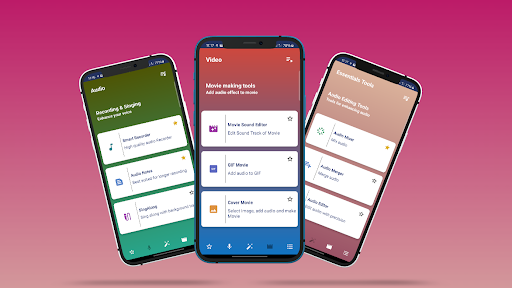
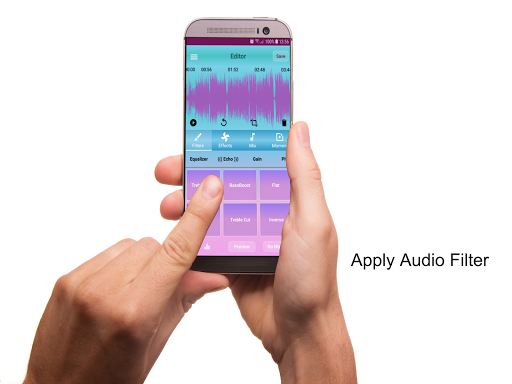
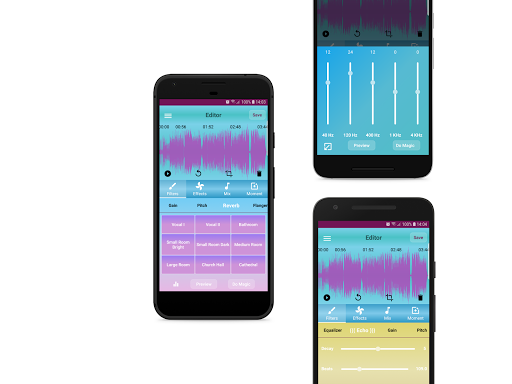
Trim, cut, mix, merge, adjust volume, and apply audio effects. Enhance your recordings with echo, reverb, equalizer, pitch shift, flanger, chorus, robot,
chipmunk, radio, and more.
Create Voiceovers
Record voiceovers for videos, stories, tutorials, reels, presentations, and creative projects. Add your voice, background music, or sound effects to make your
content more expressive.
SingAlong for Singers
Choose a background or karaoke track, record your vocals, sync your voice with music, adjust volumes, apply vocal effects, and save your performance.
Movie Soundtrack Editor
Edit the sound of your videos. Add audio, replace audio, mute video sound, overdub voice, mix background music, and create a fresh soundtrack for your movie
clips.
Audio Tools for Everyday Use
Use VoiceOver as an audio recorder, audio editor, voice editor, audio mixer, audio merger, sound effects app, and creative media tool. You can also add audio to
images or GIFs and turn them into shareable movie-style creations.
What You Can Do With VoiceOver
- Record voice, music, notes, lectures, meetings, and ideas
- Edit audio with trim, cut, mix, merge, and volume tools
- Add voice effects and audio filters
- Create voiceovers for videos and creative projects
- Sing with karaoke or background music
- Edit movie soundtracks and replace video audio
- Add audio to images and GIFs
- Save and share finished audio or video creations
Record. Edit. Mix. Create.
VoiceOver is built for people who want to do more with sound: capture it, shape it, enhance it, and turn it into something ready to share.