Paranormal Spirit Typer


Paranormal Spirit Typer Summary
Paranormal Spirit Typer is a mobile Android app in Lifestyle by Spotted: Ghosts. Released in Dec 2022 (3 years ago). It has about 1.8K+ installs and 27 ratings with a 2.68★ (poor) average. Based on AppGoblin estimates, it reaches roughly 61 monthly active users . Store metadata: updated Mar 14, 2026.
Recent activity: 5.00 installs this week (14 over 4 weeks) showing steady growth View trends →
Store info: Last updated on Google Play on Mar 14, 2026 .
2.68★
Ratings: 27
Screenshots


App Description
Can Spirits Type a Message using our Device Sensors?
The Paranormal Spirit Typer works similar to the world famous Onvoy Ghost Box, but this app uses more sensors!
Most physical ghost hunting hardware uses a type of sensor and most of these sensors are built in to mobile devices.
There are 4 options to choose from:
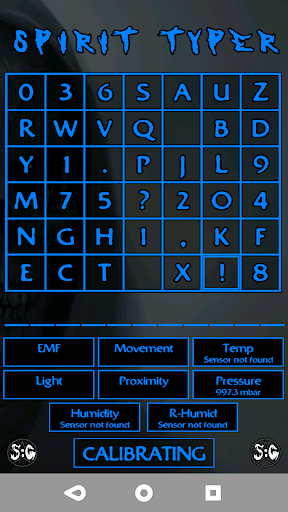
AlphaNumeric - has all the letters of the English alphabet, 2 space characters, numbers 0 - 9, !, ?, . ,
Alpha Only - All letters of the English alphabet and 2 space characters
Numeric Only - numbers 0 - 9
Yes / No - Allows for just a Yes or No response
If any of the sensors pick up a change then a beep will sound and the character (letter / number / symbol) where the selector is, is chosen and moved down to the list.
This is a great piece of scientific equipment to have with you on a Ghost Hunt or Paranormal Investigation!
Simply place the phone in any area, click the "Calibrate" button then move away from the phone, DO NOT MOVE YOUR PHONE.
If you move the phone after it has been calibrated you may need to recalibrate, simply click the "Back" button, move the device to a new area, then click "Calibrate" again.
The sensors used are:
Magnetometer - This senses Magnetic and Electromagnet fields around the device
Accelerometer - This senses any device movement and the slightest vibrations around the device
Proximity - Can detect if something moves close to the device
Light - Detects any changes in light around the device
Air Pressure - Detects any change in the Ambient Air Pressure around the device
Temperature - Detects any changes in the Ambient Temperature around the device
Humidity - Detects any changes to the Humidity around the device
Dew Point - Detects any moisture around the device
* Dew Point can only work if your device has a temperature sensor *
Please check what sensors your device has. The app will still work without them, using the sensors that your device has got. If your device is missing any sensors then it will state "Sensor not found" in the sensor box.
Google License:
To help combat fraud, Google Licensing has been implemented within this app. During the Loading Sequence an Internet connection is required in order for Google to verify that the app you are using is a legitimate copy that has been downloaded from the Google Play store. You can turn the internet connection off after the loading sequence has complete