Remaining for All Countdown up


Remaining for All Countdown up Summary
Remaining for All Countdown up is a mobile Android app in Productivity by Addhuri. Released in Mar 2023 (3 years ago). It has about 276+ installs Based on AppGoblin estimates, it reaches roughly 23 monthly active users . Store metadata: updated May 29, 2023.
Recent activity: 4.00 installs this week (19 over 4 weeks) showing declining growth View trends →
Store info: Last updated on Google Play on May 29, 2023 .
0★
Ratings: 0
Screenshots
App Description
Countdown and countup with days, hours, minutes and seconds App for all
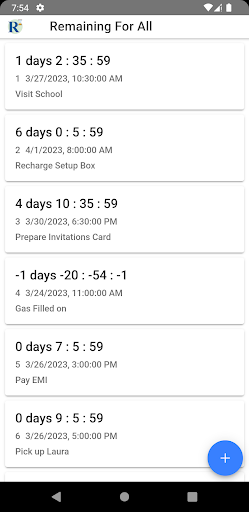
A Simple countdown and countup to count backward and forward of time to track event. It can take multiple and show it in neat way.
Useful for keeping track of
- Upcoming and Completed Tasks
- Events
- Exams
- Planned Activities
- To know status of specific date and time
Features
- Of-course Simple and easy
- Able to add multiple countdowns
- Able to add both past or future countdown ie count-up and countdown
You are
- Able to add countdown with time and data along with Title
- Able to delete on long pressing the list card or item.
How To ?
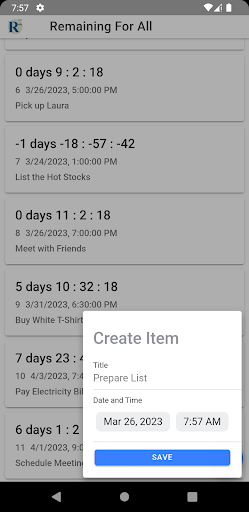
To add countdown or countup
- Click on + (plus) icon
- Click on the Date tile, then choose the year, month and date
- Click on the Time tile, then choose hour, minute, period(am/pm)
- Or
- enter title or label [optional]
- Hit Save
To delete saved countdown or countup
- Open app, long press on list tile (countdown / countup item)
- Dialog with the title "Do you want to delete this?" will appear, confirm it by pressing the "Cancel" or "Delete" button.
To View saved countdowns or countups
- Click on the Label `Remaing For All` in the header
- Or Click on the back button until the list tile appears
- Or close and reopen the app to see the list
To go back
- Or Click on the Label `Remaing For All` in the header
- Or close and reopen the app to see the list
For more option
- Open app, swipe or slide from left to right or click on App Icon/Title