Adobe Premiere Rush


Adobe Premiere Rush Summary
Adobe Premiere Rush is a free, with in-app purchases Android app in Video Players by Adobe. Released in May 2019 (7 years ago). Store last updated Sep 16, 2024
SDK intelligence: AppGoblin detected 3 ad networks(e.g. ByteDance), 2 development tools, 2 analytics: product,and 1 analytics: attribution integrated into Adobe Premiere Rush. View full SDK list →
Adobe Premiere Rush SDKs Summary
Adobe Premiere Rush was last scanned for SDKs on 2025-01-09. Below is the overview of third-party companies detected in the app. The full list of SDKs, permissions and unknowns is available here.
AppGoblin saw Adobe Premiere Rush uses 3 Ad Networks
 ByteDance
 Facebook
 Adobe Marketing
AppGoblin saw Adobe Premiere Rush uses 2 Development Tools
 Google
 Amazon
AppGoblin saw Adobe Premiere Rush uses 1 Analytics: Attribution
 Branch
AppGoblin saw Adobe Premiere Rush uses 2 Analytics: Product
 Adobe
Adobe Firebase
0★
Ratings:
Screenshots


App Description
Take the power of Adobe on the go with video editing across devices.
Shoot, edit, and share online videos anywhere.
Feed your channels a steady stream of awesome with Adobe Premiere Rush, the all-in-one, cross-device video editor. Powerful tools let you quickly create videos that look and sound professional, just how you want. Share to your favorite social sites right from the app and work across devices. Use it for free as long as you want with unlimited exports — or upgrade to access all premium features and hundreds of soundtracks, sound effects, loops, animated titles, overlays, and graphics.
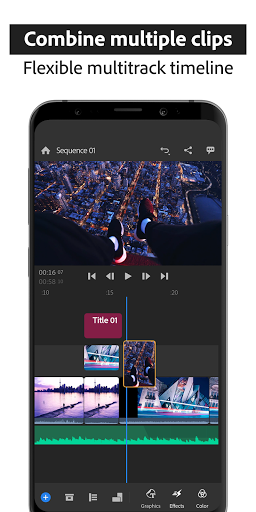
Add music and titles to videos and apply video effects to clips in your multitrack timeline with the video editor used by influencers, vloggers, and pros. Crop videos to customize and share to your favorite social sites, including YouTube, Facebook, Instagram and TikTok, right from the app.
PRO-QUALITY VIDEO
Built-in professional camera functionality lets you capture high-quality content right from the app and start video editing immediately.
EASY EDITING AND VIDEO EFFECTS
Arrange video, audio, graphics, and photos with drag and drop. Trim and crop videos, flip and mirror video clips, and add images, stickers and overlays to video clips. Adjust video speed with speed controls and enhance color with intuitive presets and customization tools.
Effortlessly create pan and zoom effects for images with one click. Make your videos pop by simply selecting the start and end points on your still images, and changing the scale and position as needed.
CUSTOMIZE ANIMATED TITLES
Access built-in animated graphics such as titles and overlays. Change the color, size, font, and more to make them yours.
GREAT SOUND
Add music to videos, including thousands of original, royalty-free soundtracks, sound effects, and loops.
MULTITRACK TIMELINE TO EDIT VIDEOS
Enjoy creative flexibility with multiple video tracks to achieve impressive effects like picture-in-picture and split-view.
MADE FOR SHARING
Crop videos for social. Easily resize videos from landscape to portrait to square for different channels. Share your videos with one click to TikTok, Instagram, Facebook , and YouTube. Portrait, 4:5, landscape, and square aspect ratios are supported. When the aspect ratio is changed, all media in a sequence is automatically resized — ideal for Instagram and YouTube.
PREMIUM USERS
Upgrade to Rush Premium to access