Lower Screen Brightness Dimmer


Lower Screen Brightness Dimmer Summary
Lower Screen Brightness Dimmer is a ad-supported Android app in Tools by Ak Web Designer. Released in Apr 2020 (5 years ago). It has about 30.6K+ installs and 187 ratings with a 3.50★ (average) average. Based on AppGoblin estimates, it reaches roughly 313 monthly active users and generates around $<10K monthly revenue (0% IAP / 100% ads). Store metadata: updated Apr 28, 2020.
Recent activity: 15 installs this week (128 over 4 weeks) showing steady growth View trends →
Store info: Last updated on Google Play on Apr 28, 2020 .
3.5★
Ratings: 187
Screenshots



App Description
Lower Screen Brightness Dimmer - Night Filter for your Eye Safety!
Have you ever felt a need to adjust the screen brightness & think about to apply overlay with different colors?
Let's do this with our application, "Lower Screen Brightness Dimmer - Night Filter".
Lower Screen Brightness Dimmer - Night Filter r is a totally free android application. Your phone's system brightness isn't connected to this Lower Screen Brightness Dimmer - Night Filter App. It will remain the same & not change. First time at the start of the app you have to allow display over the permission. This app will also help you in protecting your eye.
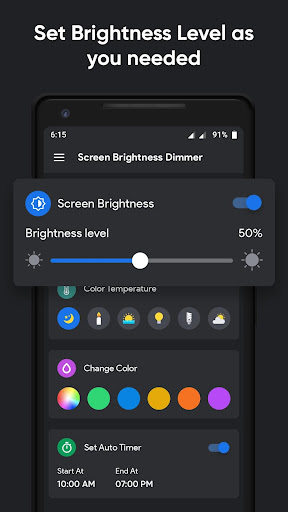
In this Lower Screen Brightness Dimmer - Night Filter App there 4 options are available. You can set the brightness level how much you needed. Select color temperature directly & brightness will auto set with related to that object light. You can choose a color for overlay by selecting or by picking 1 of them. At last, you can set the auto-timer by selecting the start & end time of the day.
By using the auto timer, the brightness level & the overlay color which are you selected will automatically apply between that time. You can also manually handle this by on/off both options.
Lower Screen Brightness Dimmer - Night Filter is very easy & simple to use by just selecting the options. You will enjoy by applying brightness level & overlay color.
Main Features of Lower Screen Brightness Dimmer - Night Filter :-
– Set Brightness Level how much you want
– Select 1 of the Color Temperature
– Choose a Color for Overlay which you like
– Set Auto Timer for auto manage
How to Use Lower Screen Brightness Dimmer - Night Filter :-
– Allow display over the permission (it's needed)
– Set any number of brightness level
– Select color temperature for auto-brightness
– Choose your favorite color for overlay
– Set Auto Timer for auto handling
Lower Screen Brightness Dimmer - Night Filter application may not require internet connectivity.
Send your Feedback or Suggestions, you can write to us on Ashishkachrola@gmail.com