Resize Image


Resize Image Summary
Resize Image is a mobile Android app in Productivity by Alpiaco. Released in Jun 2025 (11 months ago). It has about 165+ installs Based on AppGoblin estimates, it reaches roughly 18 monthly active users . Store metadata: updated Jul 6, 2025.
Recent activity: 3.00 installs this week (26 over 4 weeks) showing steady growth View trends →
Store info: Last updated on Google Play on Jul 6, 2025 .
0★
Ratings: 0
Screenshots


App Description
Resize Image - Crop & resize photos, preview & custom dimension settings
Resize Image is a straightforward Android utility for quickly cropping and resizing your JPEG or PNG photos. With a clean, modern interface and intuitive icons, you can turn any image into the perfect size in just a few taps—no extra features, no clutter.
Key Features
• Image Selection: browse and pick JPEG/PNG files from your device storage.
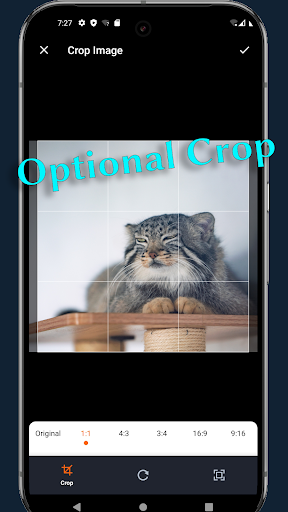
• Optional Crop: choose common aspect ratios (1:1, 4:3, 16:9) or freely adjust the crop box by dragging corners and edges.
• Flexible Resize: select from smart presets that match your image’s aspect ratio or enter custom width and height. By default, aspect ratio is maintained, but you can override it when needed.
• Instant Preview: compare original and processed images side by side before saving.
• Easy Save Options: store your result in the default “Pictures/Resize Image” folder or pick a custom location with “Save As.”
• Original Format Retained: saved files keep the same format (JPEG or PNG) as the source.
• JPEG Quality Control: adjust output quality on a 0–100% slider in Settings.
• Settings Page: view and change your default save folder and default JPEG quality.
• Responsive UI: adapts to all screen sizes and orientations, with clear labels and loading indicators during processing.
Use Resize Image to prepare photos for social media, email attachments, web uploads, or any scenario where precise image dimensions matter. Its minimal design focuses purely on crop and resize tasks, so you spend less time fumbling through menus and more time getting the perfect shot ready.