SQLite Editor Master Pro


SQLite Editor Master Pro Summary
SQLite Editor Master Pro is a mobile Android app in Tools by Amos Mobile. Released in Jan 2015 (11 years ago). It has about 4.6K+ installs and 108 ratings with a 4.02★ (good) average. Based on AppGoblin estimates, it reaches roughly 152 monthly active users . Store metadata: updated Jan 9, 2021.
Recent activity: 1.00 installs this week (2.00 over 4 weeks) showing steady growth View trends →
Store info: Last updated on Google Play on Jan 9, 2021 .
4.02★
Ratings: 108
Screenshots
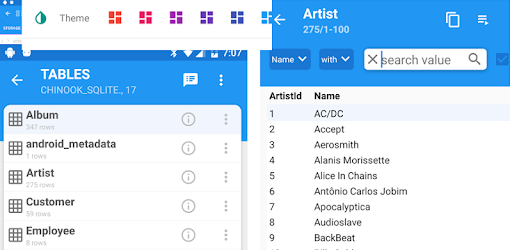


App Description
The ultimate Sqlite database editor and App config for root users.
Sqlite Master Pro is the ultimate Sqlite database editor for users on Android. Using Sqlite Master you can do almost anything in a Sqlite database. Functionality includes table data browser/editor, query editor, table export, CSV import and lot more. Root users can use this app to edit apps which have local internal database. Compare to other available SQLite apps, this is most light weight, compact and user friendly with most features and fastest SQLite Manager and Editor.
Why do you to want use SQLite Master Pro
[✔] Fastest and optimized, support large SQLite databases
[✔] Easy and simple user interface, screen theme/color choice
[✔] Very small footprint
[✔] Have almost everything that android users need
The major functionality includes
[✔] Hot System Apps - Rooted System Fix Wi-Fi tethering, Phone settings, contacts, system settings, configure app databases etc.
[✔] Rooted System browse system files in rooted system and configure.
[✔] Create/drop Sqlite databases
[✔] Create/drop/modify Sqlite tables
[✔] View table data
[✔] Sort table data by simply tapping on the column headers (first tap - ascending, second tap - descending)
[✔] Export table data to CSV
[✔] Import highly configurable CSV data into Table
[✔] Add, delete, update table row
[✔] Copy table row to clipboard by double tapping on a row
[✔] Query Maker to build custom queries and save queries, easy to use interface
[✔] Pre-generated SQL Select Queries for existing tables.
[✔] Save SQL queries which can be used later.
[✔] Delete saved queries which are not needed.
[✔] Import existing queries.
[✔] View/Copy table definition, triggers, views in the database.
[✔] Close table data, clone table schema etc
[✔] In table list page, long press has many options such as clone schema, clone data, drop/rename table etc.
[✔] History of recently opened SQLite databases.
[✔] Scheduler for data export (Schedule onetime/daily) to export results of a query into a file.