Image to PDF Converter & Scan


Image to PDF Converter & Scan Summary
Image to PDF Converter & Scan is a mobile Android app in Productivity by Ap status. Released in Apr 2026 (2 months ago). It has about 86+ installs Based on AppGoblin estimates, it reaches roughly 50 monthly active users . Store metadata: updated Apr 17, 2026.
Recent activity: 43 installs this week (86 over 4 weeks) showing strong growth View trends →
Store info: Last updated on Google Play on Apr 17, 2026 .
0★
Ratings: 0
Screenshots


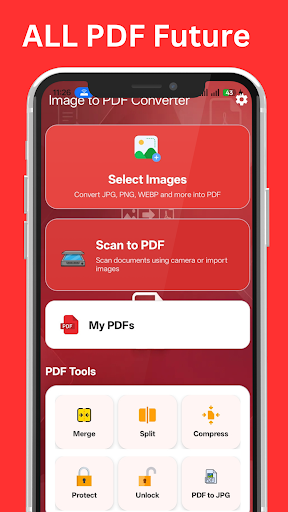
App Description
image to pdf converter, scan documents & manage PDF tools easily 2026
📄 Image to PDF Converter & Scan PDF 2026 is a simple and powerful app that helps you convert images and documents into PDF files directly on your device.
Easily turn your photos into PDF documents. This image to PDF converter also allows you to scan documents and use useful PDF tools in one place.
✨ Key Features:
🖼️ Image to PDF Converter
• Convert JPG, PNG, WEBP and other images to PDF
• Select multiple images and arrange pages easily
• Rotate and remove images before creating PDF
• Create clear and high-quality PDF files
📷 Scan to PDF
• Scan documents using your camera
• Import images and convert to PDF
• Auto fit pages to A4 size
• Apply filters like black & white, grayscale, and enhanced mode
🧰 PDF Tools:
• Merge PDF – Combine multiple PDFs into one
• Split PDF – Extract or split pages easily
• Compress PDF – Reduce file size
• Protect PDF – Add password security
• Unlock PDF – Remove password from PDF
• PDF to JPG – Convert PDF pages into images
📂 My PDFs:
• View your saved PDFs inside the app
• Open and manage files easily
⚡ How to Use:
1. Select images or scan a document
2. Adjust pages (rotate, remove, reorder)
3. Convert to PDF
4. Save and manage your files
🎯 Useful For:
• Students (notes, assignments)
• Office work and document sharing
• Scanning bills, receipts, forms
• Saving ID cards and documents
• Daily PDF creation needs
🔒 Privacy & Security:
All files are processed locally on your device. Your images and documents are not uploaded or shared unless you choose to do so.
The app is designed with a clean and modern interface for easy use.