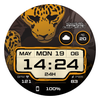

Jinya: Dirty Work
ASO Keyword Dashboard
Tracking 55 keywords for Jinya: Dirty Work in Google Play
Jinya: Dirty Work tracks 55 keywords (no keywords rank yet; 55 need traction). Key metrics: opportunity 69.2, difficulty 53.9.
This is an exclusive Dirty Work watch face created by TIMEFLIK
Tracked keywords
55
0 ranked • 55 not ranking yet
Top 10 coverage
—
Best rank — • Latest leader —
Avg opportunity
69.2
Top keyword: problem
Avg difficulty
53.9
Lower scores indicate easier wins
Opportunity leaders
- 67.6
problem
Opportunity: 73.0 • Difficulty: 46.5 • Rank —
Competitors: 879
- 68.7
installed
Opportunity: 73.0 • Difficulty: 61.6 • Rank —
Competitors: 1,076
- 65.9
wear
Opportunity: 72.0 • Difficulty: 79.5 • Rank —
Competitors: 839
- 65.0
galaxy
Opportunity: 72.0 • Difficulty: 65.3 • Rank —
Competitors: 656
- 70.4
development
Opportunity: 72.0 • Difficulty: 45.8 • Rank —
Competitors: 1,011
Unranked opportunities
problem
Opportunity: 73.0 • Difficulty: 46.5 • Competitors: 879
installed
Opportunity: 73.0 • Difficulty: 61.6 • Competitors: 1,076
wear
Opportunity: 72.0 • Difficulty: 79.5 • Competitors: 839
galaxy
Opportunity: 72.0 • Difficulty: 65.3 • Competitors: 656
development
Opportunity: 72.0 • Difficulty: 45.8 • Competitors: 1,011
High competition keywords
play
Total apps: 113,236 • Major competitors: 19,366
Latest rank: — • Difficulty: 67.3
information
Total apps: 101,893 • Major competitors: 7,805
Latest rank: — • Difficulty: 58.6
us
Total apps: 96,924 • Major competitors: 10,444
Latest rank: — • Difficulty: 61.6
phone
Total apps: 75,756 • Major competitors: 9,010
Latest rank: — • Difficulty: 68.9
please
Total apps: 75,311 • Major competitors: 7,632
Latest rank: — • Difficulty: 58.3
All tracked keywords
Includes opportunity, difficulty, rankings and competitor benchmarks
| Major Competitors | |||||||
|---|---|---|---|---|---|---|---|
| play | 65 | 100 | 67 | 86 113,236 competing apps Median installs: 62,750 Avg rating: 3.2 | — | — | 19,366 major competitor apps |
| level | 68 | 100 | 60 | 80 47,860 competing apps Median installs: 42,032 Avg rating: 3.1 | — | — | 6,533 major competitor apps |
| change | 68 | 100 | 55 | 80 48,309 competing apps Median installs: 42,177 Avg rating: 3.0 | — | — | 6,101 major competitor apps |
| try | 68 | 100 | 62 | 79 44,524 competing apps Median installs: 62,670 Avg rating: 3.2 | — | — | 7,600 major competitor apps |
| phone | 67 | 100 | 69 | 83 75,756 competing apps Median installs: 37,780 Avg rating: 3.0 | — | — | 9,010 major competitor apps |
| exclusive | 69 | 100 | 62 | 77 34,168 competing apps Median installs: 36,550 Avg rating: 3.0 | — | — | 4,554 major competitor apps |
| digital | 68 | 100 | 55 | 79 42,168 competing apps Median installs: 26,988 Avg rating: 2.7 | — | — | 4,209 major competitor apps |
| heart | 71 | 100 | 50 | 71 15,090 competing apps Median installs: 29,042 Avg rating: 2.9 | — | — | 1,461 major competitor apps |
| wear | 72 | 100 | 80 | 66 7,173 competing apps Median installs: 24,222 Avg rating: 3.2 | — | — | 839 major competitor apps |
| wear os | 71 | 100 | 76 | 60 3,443 competing apps Median installs: 13,088 Avg rating: 3.5 | — | — | 279 major competitor apps |
| information | 66 | 100 | 59 | 86 101,893 competing apps Median installs: 23,675 Avg rating: 2.6 | — | — | 7,805 major competitor apps |
| team | 69 | 100 | 58 | 78 34,741 competing apps Median installs: 33,606 Avg rating: 2.9 | — | — | 4,020 major competitor apps |
| created | 70 | 100 | 51 | 76 26,487 competing apps Median installs: 29,378 Avg rating: 2.8 | — | — | 2,330 major competitor apps |
| key | 68 | 100 | 57 | 79 40,681 competing apps Median installs: 35,653 Avg rating: 3.0 | — | — | 4,828 major competitor apps |
| install | 70 | 100 | 52 | 76 28,821 competing apps Median installs: 36,035 Avg rating: 3.0 | — | — | 2,729 major competitor apps |
| watch | 69 | 100 | 69 | 78 38,532 competing apps Median installs: 39,176 Avg rating: 3.0 | — | — | 5,315 major competitor apps |
| galaxy | 72 | 100 | 65 | 65 6,329 competing apps Median installs: 34,132 Avg rating: 3.5 | — | — | 656 major competitor apps |
| face | 70 | 100 | 55 | 75 24,650 competing apps Median installs: 46,450 Avg rating: 3.1 | — | — | 3,493 major competitor apps |
| problem | 73 | 100 | 46 | 68 8,982 competing apps Median installs: 34,872 Avg rating: 2.8 | — | — | 879 major competitor apps |
| solve | 70 | 100 | 52 | 74 22,448 competing apps Median installs: 36,970 Avg rating: 3.2 | — | — | 2,937 major competitor apps |
| always | 67 | 100 | 59 | 82 65,220 competing apps Median installs: 32,990 Avg rating: 2.9 | — | — | 7,264 major competitor apps |
| work | 68 | 100 | 61 | 81 52,752 competing apps Median installs: 28,708 Avg rating: 2.8 | — | — | 5,048 major competitor apps |
| know | 67 | 100 | 59 | 82 59,090 competing apps Median installs: 29,580 Avg rating: 2.8 | — | — | 5,859 major competitor apps |
| please | 67 | 100 | 58 | 83 75,311 competing apps Median installs: 36,602 Avg rating: 3.0 | — | — | 7,632 major competitor apps |
| watch face | 71 | 100 | 42 | 58 2,469 competing apps Median installs: 8,717 Avg rating: 3.5 | — | — | 44 major competitor apps |
App Description
This is an exclusive Dirty Work watch face created by TIMEFLIK
***This app is a Goolle Play app.
It can be installed and operated in your smartwatch only.
The compatibility warning message from Google Play indicates that it is a watch-only app.
There is no problem with the use, so please don’t be confused.
[How to use]
After downloading, change the watch face by touching the screen for a while.
If your watch is a Galaxy watch, you can also change it from [Galaxy Wearable] > [Watch faces].
_______________________________
[Key Features]
- Digital Time
- 12/24H Format
- Day of Month
- Date
- Battery Status
- Heart Rate
- 1 Editable Complication
- 4 Preset Shortcut
- 10 Theme Colors
- Always On Display
[Troubleshooting]
Please let us know the information below to help@apposter.com.
Our development team will try to reproduce and solve it.
*This watch face supports wear OS devices.
_______________________________
**How to set a Phone Battery Level**
https://play.google.com/store/apps/details?id=com.weartools.phonebattcomp
1. Install the Phone Battery Level app on both the phone and the watch.
2. Select Phone Battery Level in Complications.
