AR Drawing Trace & Sketch


AR Drawing Trace & Sketch Summary
AR Drawing Trace & Sketch is a ad-supported, with in-app purchases Android app in Art And Design by The Appversal. Released in May 2024 (2 years ago). It has about 47K+ installs Based on AppGoblin estimates, it reaches roughly 1.9K monthly active users and generates around $<10K monthly revenue (24% IAP / 76% ads). Store metadata: updated Nov 17, 2025, version 13.
Recent activity: 3.00 installs this week (24 over 4 weeks) showing steady growth View trends →
Advertising: AppGoblin detected 1.00 monetized ad creatives shown inside the app.
Data tracking: SDKs and third-party integrations were last analyzed on Sep 5, 2025. The app's network data flows (API traffic to/from the app and its SDKs) were last crawled on Aug 27, 2025.
Store info: Last updated on Google Play on Nov 17, 2025 (version 13).
SDKs, Trackers & Permissions
AR Drawing Trace & Sketch was last scanned for SDKs 2025-09-05. Below is the overview of third party companies detected in the app. The full list of raw SDKs, app permissions and unknown SDKs is available here.
AppGoblin saw AR Drawing Trace & Sketch uses 8 Development Tools
 JetBrains
 Airbnb Engineering
 JetBrains IntelliJ
AppGoblin saw AR Drawing Trace & Sketch uses 1 Mediation
 AdMob
AdMobAppGoblin saw AR Drawing Trace & Sketch uses 1 Ad Networks
 Google
AppGoblin saw AR Drawing Trace & Sketch uses 1 Analytics: Product
 Firebase
App Details
App Store
Ads & App-Ads.txt
AppGoblin SDK Scans
2.55★
Ratings: 0
Screenshots

App Description
AR Drawing Trace & Sketch - art sublimates, masterpieces of paint & drawing born
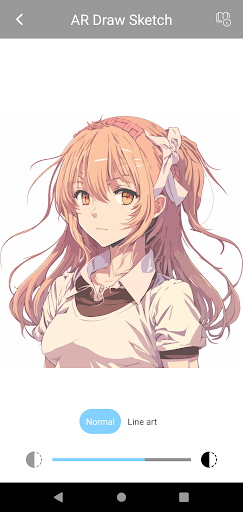
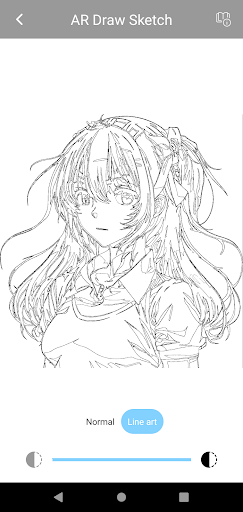
If you are passionate about drawing and painting, you will probably find that AR Drawing (Utilizes Augmented Reality Drawing) is a great application that helps you turn all things and events onto paper.
🎨 Main functions of AR Draw app:
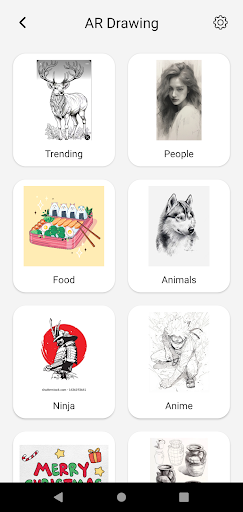
- Trace and sketch pictures: The application provides a treasure trove of photos including many topics such as: Food, Car, Nature... so you can unleash your creativity to bring all things into drawings
- Trace and sketch images from the camera: You can take photos with the camera and sketch on the image directly. Device helps you capture every wonderful moment and AR Drawing helps turn that moment into your very own painting.
- Convert images from your photo library to sketch: in addition to real-time photos, all the images and moments you have stored so far in your device's library can also be turned into artist works. .
- The AR Drawing application provides built-in flashlight so that even in unfavorable lighting conditions, your passion for drawing can still take off.
- Zoom in & out: if your picture is small with many intricate details, AR Draw & Sketch allows you to zoom in on the picture to make it easier to practice drawing.
👩🏻🎨 How to use: AR Drawing is really an easy-to-use application, you only need an object to place your device (like a cup), a page of paper and a place for you to sit and enjoy your artistic passion.
- Step 1: Place the device on the cup, adjust the device so that the image you see through the phone screen is in the correct position and size you want on the page.
- Step 2: Use a pencil or pen to trace and sketch every detail and stroke of the picture on the page. Done!
✏️ AR Drawing Trace & Sketch also helps you capture and record the moment you are captivated by your wonderful work with the function.
❤️ Hopefully the application is a great friend on your path to practicing and developing your art. Please share with us your achievements and masterpieces. And send feedback if you need any more features or updates from the app, we will do everything possible to make you love it. Thank you for also loving art and for using our app!