Draweze: AR Drawing & Sketch

Draweze: AR Drawing & Sketch Summary
Draweze: AR Drawing & Sketch is a with in-app purchases Android app in Art And Design by MEDIADECODE. Released in Sep 2024 (1 year ago). It has about 21.7K+ installs Based on AppGoblin estimates, it reaches roughly 1.8K monthly active users and generates around $<10K monthly revenue (100% IAP / 0% ads). Store metadata: updated Jul 9, 2025.
Recent activity: 581 installs this week (1.2K over 4 weeks) showing exceptional growth View trends →
Store info: Last updated on Google Play on Jul 9, 2025 .
0★
Ratings: 0
Screenshots



App Description
Sketch art effortlessly and bring your creativity to life with AR Drawing Sketch
The AR Drawing Sketch App is a revolutionary tool that combines digital and physical art to enhance learning and practice in drawing. Whether you're a beginner learning to draw or a professional refining your skills, our AR coloring app provides an immersive and intuitive experience to bring your ideas to life.
The AR Drawing Sketch Paint App is designed for daily use, providing creative accessibility anytime and anywhere. With AR draw powerful tools, you can enhance your skills, experiment with designs, and unlock your full artistic potential.
Here’s how our AR drawing app enhances your creativity:
Step-by-Step Drawing Guidance
Our simple, step-by-step guidance makes it easy for beginner artists to follow, while experienced artists will also find valuable tips to enhance their skills and enjoy the process.
AR Drawing and Tracing
AR Drawing and Tracing allows users to project images onto real surfaces, making it easy to trace and sketch with precision.
Wide Range of Drawing Themes
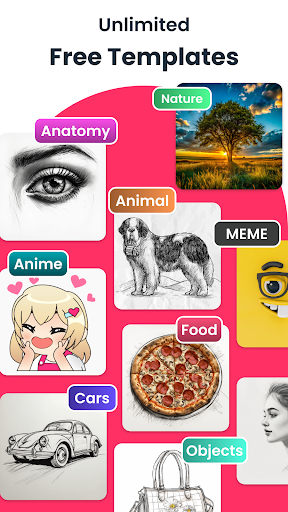
AR Drawing allowing users to explore various artistic styles and subjects like Animals, Cars, Anime, Food and many others.
Image Adjustment Tools
Image adjustment tools allow users to customize their sketches by modifying transparency, rotation, alignment and even use the flashlight for better visibility.
Turn Photos into Sketches
Easily convert your photos into detailed sketches with just a tap, creating stunning pencil-like artwork and this feature converts images into traceable outlines, simplifying drawing and creativity.
Sketch Lock and Flip Tool
Sketch Lock and Flip Tool helps you fix your sketch in position while effortlessly flipping it for better alignment.
Who Can Use AR Drawing Sketch App?
1. Art Education: Helps beginners learn to draw with guided assistance.
2. Professional Sketching: Perfect tool for designers, illustrators, and architects to create rapid prototypes.
3. Tattoo Artists: Helps sketch and perfect tattoo ideas before committing to ink.
4. DIY & Crafts: Supports hobbyists in creating murals, calligraphy, and decorations.
5. Children’s Learning: Engages kids in creative activities with interactive AR experiences.
The AR Drawing and Tracing feature bridges the gap between digital and traditional art, making sketching easier, faster, and more accurate. Transform your ideas into reality with ease, and