Timestamp Camera: Photo Date


Timestamp Camera: Photo Date Summary
Timestamp Camera: Photo Date is a free, ad-supported, with in-app purchases Android app in Photo And Video by Artify Inc.. Released in Aug 2017 (9 years ago). It has about 2.5M+ installs and 49K ratings with a 4.74★ (excellent) average. Based on AppGoblin estimates, it reaches roughly 17K monthly active users and generates around $<10K monthly revenue (62% IAP / 38% ads). Store last updated Mar 27, 2026
Recent activity: 6.3K installs this week (23K over 4 weeks) showing steady growth , and 197 new ratings this week View trends →
SDK intelligence: AppGoblin detected 15 ad networks(e.g. InMobi), 6 development tools, 2 mediation, 2 business tools,and 1 analytics: product integrated into Timestamp Camera: Photo Date. View full SDK list →
Data tracking: The app's network data flows (API traffic to/from the app and its SDKs) were last crawled on Jan 3, 2026.
Timestamp Camera: Photo Date SDKs Summary
Timestamp Camera: Photo Date was last scanned for SDKs on 2026-09-18. Below is the overview of third-party companies detected in the app. The full list of SDKs, permissions and unknowns is available here.
 Kotlin
 Apollo
 Google
 Bumptech
 InMobi
 Fyber
Fyber VK
VK Unity
Unity AdMob
AdMob Kakao
Kakao Firebase
4.74★
Ratings: 49K
Screenshots



App Description
Track diet, workout, study & growth with date stamped photos. Premium styles.
Know exactly when your photos were taken.
Timestamp Camera lets you add a clear date and time watermark to new photos or images from your gallery so your memories never get mixed up.
Whether you're tracking your diet, workouts, study routine, baby's growth, or project progress, a simple timestamp makes every photo easier to remember and compare. Perfect for meal tracking, body transformation, parenting milestones, construction updates, and daily journaling.
What you can do
• Place a date & time stamp anywhere on your photo
• Pick from 26 premium timestamp styles (Normal, Simple, Slim, Digital, Woowahan, and more)
• Change font color to match your photo
• Import photos from your gallery and stamp them
• Save and share directly to Instagram, WhatsApp, and social media
• Track your year with the 2025 Year Review feature
How it works
1. Take a photo or choose one from your gallery
2. Select the timestamp style you like (26 styles available)
3. Adjust the color and position
4. Save to your camera roll
5. Share to social media if you want!
That's it.
Why use a timestamp?
When you move or back up photos, the file date can change.
You might see "2025" on a photo you actually took in 2022.
With Timestamp Camera, the date and time are written on the photo itself as a watermark, so you always know when that moment happened. No more confusion when organizing your photo library.
Who uses Timestamp Camera?
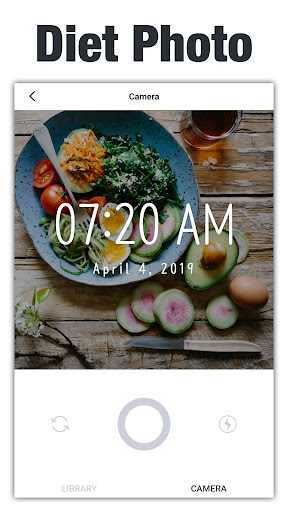
• Diet & fitness – Track body changes, workouts, and meals over time. Perfect for weight loss journeys, muscle gain, and healthy eating habits
• Moms & dads – Capture baby growth and create a timeline of memories. Document first steps, milestones, and everyday moments
• Students – Mark daily study sessions or note-taking for easier review. Track your learning progress and exam preparation
• Event & project work – Record stages of events, construction, or projects to share with clients. Perfect for contractors, event planners, and freelancers
• Photographers & travelers – Show how the same place looks at different seasons or times. Create before/after comparisons
Camera features
• Clear, bright photos using front or back camera
• High-resolution zoom for detailed shots
• Flash support for low-light conditions
• Basic white balance control for better colors
• HD quality photos (no quality reduction)
Premium Timestamp Styles
Get access to all 26 beautiful timestamp designs:
• 7 free styles (Normal, Simple, Mini, Amatic, Glypha, Barunpen, Box)
• 19 premium styles including Slim Pack (6 styles), Woowahan Pack (6 styles), and Digital Clock Pack (6 styles)
• Anniversary style for special dates
• Custom colors and positioning for all styles
Subscription details
• Unlock all premium timestamp styles with Timestamp Premium
• Remove all ads for a cleaner experience
• 7-day free trial available
• Cancel anytime before renewal
• Monthly and annual plans available
Other details
• Light, simple design that's easy to use
• Does not reduce your photo quality
• Year Review feature to look back on your 2025 photos
• Stable and responsive during normal use
• Regular updates with new styles
• Available in 10+ languages
Perfect for:
Photo journaling, meal prep tracking, workout logs, baby books, project documentation, before and after photos, daily habits, goal achievement, memory keeping, and any moment you want to remember forever.
Download Timestamp Camera and start putting real dates on real moments.