Date Converter


Date Converter Summary
Date Converter is a ad-supported, with in-app purchases Android app in Productivity by TenTal Apps. Released in Mar 2025 (1 year ago). It has about 4.7K+ installs Based on AppGoblin estimates, it reaches roughly 552 monthly active users and generates around $<10K monthly revenue (63% IAP / 37% ads). Store metadata: updated Jan 4, 2026.
Recent activity: 259 installs this week (417 over 4 weeks) showing strong growth View trends →
Store info: Last updated on Google Play on Jan 4, 2026 .
0★
Ratings: 0
Screenshots


App Description
Convert dates between Gregorian, Islamic, Hebrew, Persian and other calendars.
Date Converter is a comprehensive tool for converting dates between different calendar systems used around the world. With a clean, intuitive interface and powerful features, this app makes it easy to translate dates across multiple calendars with precision and ease.
SUPPORTED CALENDAR SYSTEMS:
• Gregorian (ISO) - The internationally recognized standard calendar
• Islamic - Lunar calendar used in the Islamic world
• Coptic - Ancient Egyptian calendar still used by the Coptic Orthodox Church
• Um Al Qura - Official calendar of Saudi Arabia
• Hebrew - Traditional Jewish calendar
• Solar Hijri (Iranian/Persian) - Official calendar of Iran and Afghanistan
KEY FEATURES:
✓ Authentic Month Names
View the proper month names in each calendar system (e.g., Muharram, Safar for Islamic; Farvardin, Ordibehesht for Solar Hijri), ensuring cultural accuracy and authenticity.
✓ Modern, Intuitive UI
Enjoy a clean, Material Design 3 interface that makes date conversion simple and pleasant. Choose between light, dark, or system theme options to suit your preference.
✓ Customizable Display
Select which calendars you want to see and arrange them in your preferred order. Hide calendars you don't use to streamline your experience.
✓ Advanced Date Selection
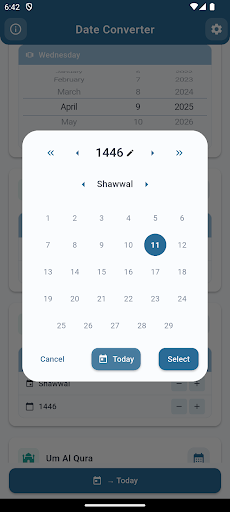
Tap on a calendar to select it, use + and - buttons to adjust dates, or tap the calendar icon to open a specialized date picker. You can even edit year numbers directly in custom date pickers.
✓ Instant Synchronization
All calendars automatically update to show the equivalent date when any date is changed, allowing you to see conversions in real-time.
✓ "Today" Button
Quickly reset all calendars to today's date with a single tap.