SketchArt: AR Trace & Draw
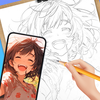

SketchArt: AR Trace & Draw Summary
SketchArt: AR Trace & Draw is a ad-supported, with in-app purchases Android app in Art And Design by BG.Studio. Released in May 2024 (2 years ago). It has about 3.5M+ installs and 6K ratings with a 4.48★ (good) average. Based on AppGoblin estimates, it reaches roughly 369K monthly active users and generates around $10K+ monthly revenue (74% IAP / 26% ads). Store metadata: updated Jun 14, 2026, version 69.
Recent activity: 68.8K installs this week (255.2K over 4 weeks) showing declining growth , and 166 new ratings this week View trends →
Advertising: AppGoblin detected 1.00 monetized ad creatives shown inside the app.
Data tracking: SDKs and third-party integrations were last analyzed on Jun 3, 2026. The app's network data flows (API traffic to/from the app and its SDKs) were last crawled on Jun 11, 2026.
Store info: Last updated on Google Play on Jun 14, 2026 (version 69).
SDKs, Trackers & Permissions
SketchArt: AR Trace & Draw was last scanned for SDKs 2026-06-03. Below is the overview of third party companies detected in the app. The full list of raw SDKs, app permissions and unknown SDKs is available here.
AppGoblin saw SketchArt: AR Trace & Draw uses 6 Development Tools
 Airbnb Engineering
 Square
 Google
 Unity
UnityAppGoblin saw SketchArt: AR Trace & Draw uses 11 Ad Networks
 Vungle
 VK
VK Pangle
AppGoblin saw SketchArt: AR Trace & Draw uses 1 Analytics: Attribution
 Adjust
AppGoblin saw SketchArt: AR Trace & Draw uses 3 Mediation
 AppLovin
 AdMob
AdMobAppGoblin saw SketchArt: AR Trace & Draw uses 1 Analytics: Product
 Firebase
AppGoblin saw SketchArt: AR Trace & Draw uses 1 Business Tools
App Details
App Store
Ads & App-Ads.txt
AppGoblin SDK Scans
4.48★
Ratings: 6K
Screenshots


App Description
Level up your drawing skills—trace, sketch, and learn faster with SketchArt.
🎨 Welcome to SketchArt: AR Draw & Trace! Unleash your creativity and watch your drawings come alive with stunning AR effects!
✏️ Discover powerful features that unlock your creativity through advanced tools and effects. Whether you’re a beginner or a seasoned artist, SketchArt offers a space for everyone to express themselves freely — perfect for drawing beginners and pros alike.
✏️ Connect with our lively community — share your art, explore others’ creations, and get inspired. With SketchArt App, your imagination is the only limit.
✨ How to get started:
1. Select or import a photo from the Art Gallery 🖼️
2. Position your phone steadily on a tripod or solid surface 📱🛠️
3. Use AR technology to create stunning artwork right before your eyes! ✨🖌️
Key Features
🌟Magic Sketch: Draw in AR📷
- Transform your sketches by blending them with the real world using your device’s camera and customizable opacity.
- Explore a diverse range of drawing categories—including Anime 🎭, Chibi 💫, people and body parts 👤, animals 🐾, food 🍕, text art ✒️, and popular themes like dog, cat, dinosaur, and rabbit drawings. Whether you’re a beginner learning step-by-step or an artist tracing from photos, there’s something here for everyone.
🧪Amazing Advanced Tools & Templates:
- Import images from your camera roll, gallery, or browser.
- Use features like pencil photo conversion ✏️, video recording 🎬, photo capture 📷, opacity control 🌫️, flashlight toggle 🔦, lock 🔒, and reset 🔄.
- Perfect for drawing over photos and practicing step-by-step drawing techniques.
✏️ AI Drawing & Sketch:
- Turn any photo into clean line art, anime, or cartoon styles in seconds.
- Our AI simplifies images into easy-to-follow outlines so you can trace, sketch, and learn drawing faster. Perfect for beginners and artists who want a quick starting point.
✔ Convert photos to line art, anime, cartoon
✔ Optimized for AR tracing & drawing
✔ Clean outlines for easy sketching
✔ Great for learning to draw step-by-step
🎨 Color Art
Relax and get creative by coloring your favorite images.
Choose from a variety of styles and bring your artwork to life with color.
✔ Pick any image to color
✔ Multiple coloring styles
✔ Stress-free creative experience
✔ Perfect for all ages
🏫 Step-by-Step Drawing Tutorials:
- Master your skills with our 7-day drawing course designed for all levels.
- Learn to draw progressively with lessons that challenge and expand your artistic abilities.
🏆My Sketchbook:
- Save your best work and share with friends 📤.
- Track your creative growth and achievements as you explore AR art with your personal profile.
Download SketchArt: AR Draw & Trace App today and join an inspiring community that’s redefining art through augmented reality and AR camera drawing! 🚀🎨