Lock Screen OS

Lock Screen OS Summary
Lock Screen OS is a ad-supported, with in-app purchases Android app in Personalization by Apps Genz. Released in Mar 2021 (5 years ago). It has about 10.7M+ installs and 64.4K ratings with a 3.79★ (average) average. Based on AppGoblin estimates, it reaches roughly 157.6K monthly active users and generates around $10K+ monthly revenue (65% IAP / 35% ads). Store metadata: updated Jan 15, 2026, version 83.
Recent activity: 54.2K installs this week (181.8K over 4 weeks) showing steady growth , and 28 new ratings this week View trends →
Advertising: AppGoblin detected 1.00 monetized ad creatives shown inside the app.
Data tracking: SDKs and third-party integrations were last analyzed on May 29, 2026. The app's network data flows (API traffic to/from the app and its SDKs) were last crawled on Jan 31, 2026.
Store info: Last updated on Google Play on Jan 15, 2026 (version 83).
SDKs, Trackers & Permissions
Lock Screen OS was last scanned for SDKs 2026-05-29. Below is the overview of third party companies detected in the app. The full list of raw SDKs, app permissions and unknown SDKs is available here.
AppGoblin saw Lock Screen OS uses 1 Analytics: Attribution
 Adjust
AppGoblin saw Lock Screen OS uses 8 Ad Networks
 Mintegral
 VK
VK Vungle
 Facebook
AppGoblin saw Lock Screen OS uses 5 Development Tools
 Google
 Kotlin
 Bumptech
 Airbnb Engineering
AppGoblin saw Lock Screen OS uses 1 Analytics: Product
 Firebase
AppGoblin saw Lock Screen OS uses 1 Mediation
 AdMob
AdMobAppGoblin saw Lock Screen OS uses 1 Business Tools
App Details
App Store
Ads & App-Ads.txt
AppGoblin SDK Scans
3.79★
Ratings: 64.4K
Screenshots

App Description
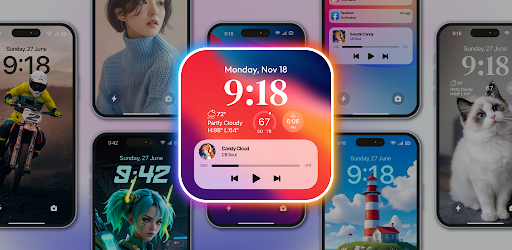
Personalize Lock Screen with beautiful wallpapers, fonts, widgets
Lock Screen OS is a great replacement for system lock of Android.
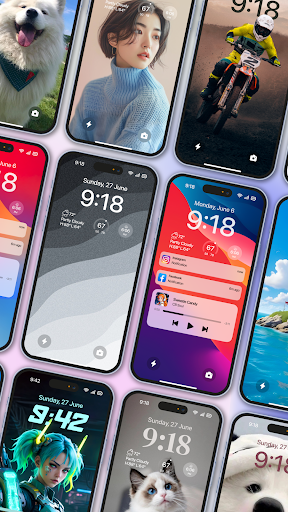
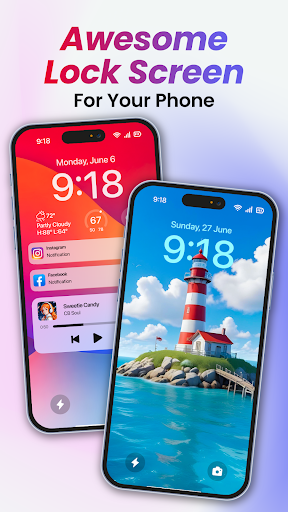
Lock Screen OS provides you with all-new ways to personalize your Lock Screen. Showcase favorite photos, customize font styles, and display a set of widgets to get information at a glance.
🔻 Reimagined Lock Screen OS
Change your phone into an OS with all-new ways to personalize your Lock Screen. Customize font styles, and display a set of widgets to get information at a glance.
🔻 Create multiple Lock Screens
You can now create different Lock Screens, each with a unique backdrop and style, and easily switch between them. Browse a gallery of wallpapers with suggested photos and themed collections for inspiration.
🔻 Notifications
View notifications on the Lock Screen in an expanded list view, stacked view, or hidden view.
To make Lock Screen OS working most perfect. You must grant some special permissions like to:
- CAMERA: Open camera in your phone when screen is locked.
- READ_PHONE_STATE: Show phone call when screen is locked.
- NOTIFICATION ACCESS: Show notification when screen is locked.
- READ/WRITE_EXTERNAL_STORAGE: Support wallpaper set from your storage and our server save image.
- DRAW OVER SCREEN: Show Lock Screen in over all application
- ACCESSIBILITY PERMISSION: To enable Lock Screen OS, please allow Accessibility services. The service is only used to allow this app to draw on the phone's home screen and status bar. The application commits not to collect or share any user information about this accessibility right.
Step setting in the first install can help Lock Screen OS applications work better.
Step 1 : Grant all permission requirements.
Step 2 : Setup pass code > click on Pass code option > create new or change pass code.
Step 3 : Disable system notification > Click on Disable system lock option > Please note that , selected system lock is "None".
Step 4 : If you need to hide content and show system notification > Please select Notification option and turn on switch if needed.
You can quickly view with youtube video at : https://youtu.be/bpaan93yfCU
Lock Screen OS is a perfect application and helps you have wonderful Android applications with beautiful interface.
Disclaimers
All product names, logos, brands, trademarks and registered trademarks, which are not owned by us, are property of their respective owners
All company, produc