Back Button Anywhere


Back Button Anywhere Summary
Back Button Anywhere is a ad-supported Android app in Tools by ND Infosoft. Released in Feb 2022 (4 years ago). It has about 13K+ installs Based on AppGoblin estimates, it reaches roughly 896 monthly active users . Store metadata: updated Nov 12, 2025.
Recent activity: 122 installs this week (338 over 4 weeks) showing steady growth View trends →
Store info: Last updated on Google Play on Nov 12, 2025 .
0★
Ratings: 0
Screenshots


App Description
iPhone-style floating Back Button & Assistive Touch for easy navigation.
🧭 Back Button Anywhere – Assistive Touch Navigation Bar
Back Button Anywhere gives you a smart, floating Back Button, Home Button, and Recent Apps Button just like the iPhone Assistive Touch.
If your Android navigation keys are not working or you want a stylish iPhone-style back key, this app is the best solution.
With this app, you can easily add a virtual back button and navigation bar on any screen. Move it anywhere, customize the look, and control your device faster than ever!
🚀 Top Features
✅ Floating Back / Home / Recent buttons
✅ Customize button style, color, size, opacity, and background
✅ Add iPhone-style Assistive Touch button on Android
✅ Choose from gradient backgrounds, themes, and images
✅ Works smoothly on all Android phones and tablets
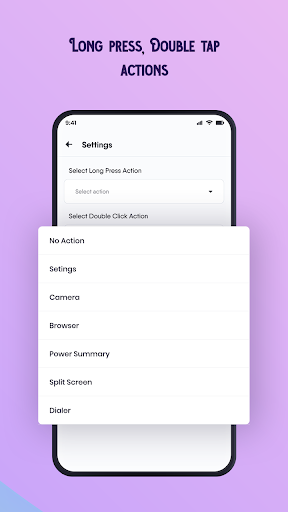
✅ One-tap or long-press actions – just like gesture navigation
✅ Lightweight, fast, and battery-friendly
🎨 Customize Your Navigation Bar
Change button color or background color
Apply gradient or image backgrounds
Adjust button size and position anywhere on the screen
Create your own floating assistive button for quick access
⚙️ Required Permissions
This app uses limited permissions to perform navigation actions only:
Accessibility Service – used to perform system actions such as Back, Home, and Recent apps.
Overlay Permission – required to show the floating button on top of other apps.
These permissions are used only for navigation features.
No personal data is collected, stored, or shared.
🪄 Why Use Back Button Anywhere?
Replace broken or unresponsive hardware buttons
Get an iPhone-style assistive navigation button on Android
Enjoy a customizable navigation experience
Simplify control with one-handed use
The best back navigation app for all Android devices
Back Button | Assistive Touch | Floating Back Button | Home Button | Navigation Bar | Virtual Key | Accessibility Button | iPhone Style Back Button | Floating Touch | Easy Touch | Gesture Navigation | Soft Key | Custom Navigation Button | Back Navigation App | Broken Button Fix