NotaioID


NotaioID Summary
NotaioID is a mobile Android app in Productivity by Bit4id. Released in May 2021 (5 years ago). It has about 1.9K+ installs Based on AppGoblin estimates, it reaches roughly 70 monthly active users . Store metadata: updated Oct 2, 2023.
Recent activity: 2.00 installs this week (3.00 over 4 weeks) showing steady growth View trends →
Store info: Last updated on Google Play on Oct 2, 2023 .
0★
Ratings: 0
Screenshots


App Description
Reading and verifying the authenticity of electronic identity documents
NotaioID is entirely created by the Italian Notariat, and participates in the country's digitization programs.
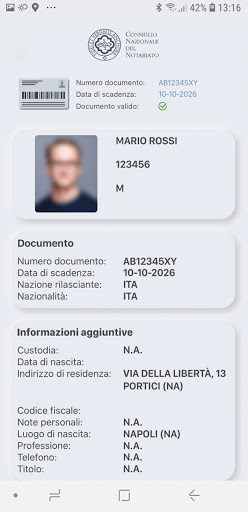
With NotaryID you can extract, in total autonomy, the personal data directly from the Electronic Identity Card (CIE) or from the Electronic Passport (PE). By scanning the document - by means of the camera and the NFC reader of the smartphone - the app is able to acquire the personal data contained in the CIE and PE and send them to the notary who requests them for the uses permitted by law.
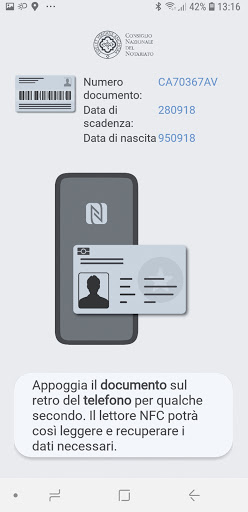
To extract personal data, just frame the document with the camera and then bring it to the back of the smartphone, in correspondence with the NFC reader. Before sending, it is always possible to check the result of the scan and the accuracy of the data reported.
The app is compatible with Android and iOS smartphones equipped with an NFC proximity reader, with which to read the data written on the electronic document's microprocessor.
How to use the app:
• Check in the smartphone Settings that the NFC function is enabled;
• Launch the app and start the scan;
• Use the camera to frame the code on the Electronic Identity Card or Electronic Passport;
• Hold the document close to the back of the smartphone for a few seconds. The NFC reader will thus be able to read and extract the data present;
• Verify the accuracy of the data acquired through the scan and click on the "Send your data" button; enter the "Request ID" code provided by the notary.