Lockwatch — Thief Catcher


Lockwatch — Thief Catcher Summary
Lockwatch — Thief Catcher is a with in-app purchases Android app in Tools by BlokeTech. Released in Mar 2013 (13 years ago). It has about 8.2M+ installs and 73.4K ratings with a 4.30★ (good) average. Based on AppGoblin estimates, it reaches roughly 71.6K monthly active users and generates around $<10K monthly revenue (100% IAP / 0% ads). Store metadata: updated May 21, 2026, version 860.
Recent activity: 2.3K installs this week (10.8K over 4 weeks) showing steady growth , and -10 new ratings this week View trends →
Data tracking: SDKs and third-party integrations were last analyzed on May 1, 2026. The app's network data flows (API traffic to/from the app and its SDKs) were last crawled on May 1, 2026.
Store info: Last updated on Google Play on May 21, 2026 (version 860).
SDKs, Trackers & Permissions
Lockwatch — Thief Catcher was last scanned for SDKs 2026-05-01. Below is the overview of third party companies detected in the app. The full list of raw SDKs, app permissions and unknown SDKs is available here.
 Google
 AdMob
AdMob Firebase
App Details
App Store
Ads & App-Ads.txt
AppGoblin SDK Scans
4.3★
Ratings: 73.4K
Screenshots



App Description
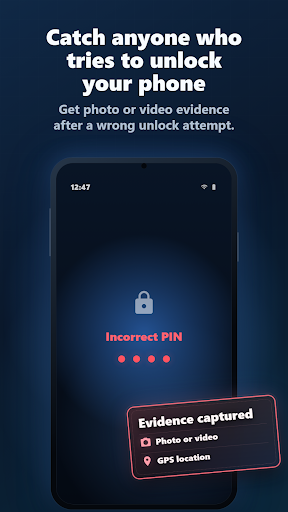
Catch anyone who tries to unlock your phone — with video and location evidence
🔐 PROTECT YOUR PHONE
Lockwatch emails you photo or video evidence and your phone's location when someone tries to unlock your phone with the wrong PIN, password or pattern.
Choose photos or a 20-second video clip. Lockwatch sends the evidence to your email so you can quickly see what happened.
Lockwatch can also alert you after your phone powers on or restarts, or when a SIM card is changed.
🔑 CHOOSE YOUR ACCESS
Use all Lockwatch features with the free ad-supported tier, or choose a paid subscription for ongoing ad-free protection.
⚙️ FEATURES
Failed unlock alerts
• Detects failed unlock attempts on your existing Android lock screen
• Captures photos or a 20-second video clip of the intruder
• Emails the evidence along with your phone's location
• Cancels the alert if the correct code is entered within 10 seconds, so a simple mistype will not send an email
SIM and power-on alerts
• Detects SIM changes and emails the location with new SIM details
• Emails location immediately after power-on or restart, before the phone is unlocked
History and reliability
• Saves alert history in the app so you can view, share or delete past alerts
• Automatically retries sending alerts when mobile data or Wi-Fi becomes available
• Stays lightweight by only reacting to key security events, so it will not drain your battery
ℹ️ NOTES
• Lockwatch only triggers when an unlock attempt contains at least four digits, password characters or pattern dots.
• This app uses the Device Administrator permission to monitor screen unlock attempts. Lockwatch will never use this permission to wipe your phone.