Text to Voice (PDF, OCR, TTS)

Text to Voice (PDF, OCR, TTS) Summary
Text to Voice (PDF, OCR, TTS) is a ad-supported Android app in Tools by Health & Fitness AI Lab. Released in Feb 2020 (6 years ago). It has about 1.7M+ installs and 15.8K ratings with a 4.46★ (good) average. Based on AppGoblin estimates, it reaches roughly 201.1K monthly active users and generates around $10K+ monthly revenue (0% IAP / 100% ads). Store metadata: updated Oct 26, 2025, version 14.
Recent activity: 1.4K installs this week (7.7K over 4 weeks) showing steady growth , and 7.00 new ratings this week View trends →
Data tracking: SDKs and third-party integrations were last analyzed on Oct 18, 2025. The app's network data flows (API traffic to/from the app and its SDKs) were last crawled on May 18, 2026.
Store info: Last updated on Google Play on Oct 26, 2025 (version 14).
SDKs, Trackers & Permissions
Text to Voice (PDF, OCR, TTS) was last scanned for SDKs 2025-10-18. Below is the overview of third party companies detected in the app. The full list of raw SDKs, app permissions and unknown SDKs is available here.
AppGoblin saw Text to Voice (PDF, OCR, TTS) uses 1 Analytics: Product
 Firebase
AppGoblin saw Text to Voice (PDF, OCR, TTS) uses 1 Ad Networks
 Google
AppGoblin saw Text to Voice (PDF, OCR, TTS) uses 5 Development Tools
 JetBrains
 Kotlin
AppGoblin saw Text to Voice (PDF, OCR, TTS) uses 1 Mediation
 AdMob
AdMobApp Details
App Store
Ads & App-Ads.txt
AppGoblin SDK Scans
4.46★
Ratings: 15.8K
Screenshots

App Description
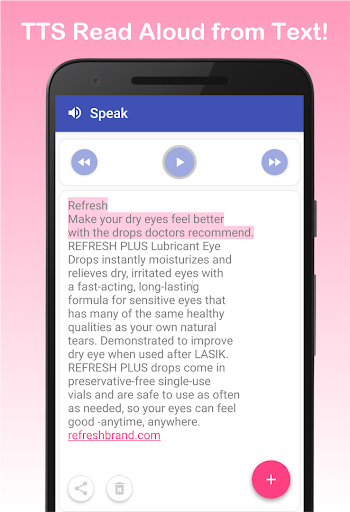
Text to Speech (TTS) - Read aloud text reader from Web, PDF + OCR text scanner
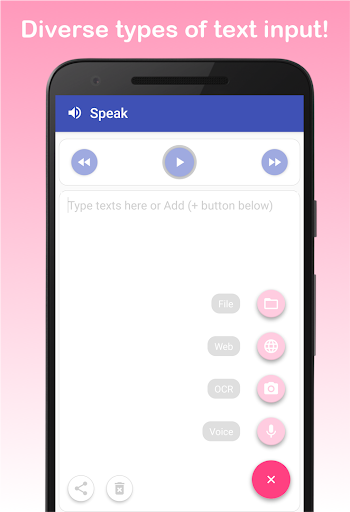
Support diverse types of text inputs reader (text to speech)
1. You can read text from files (PDF and TXT) like your ebook, papers, news article, email
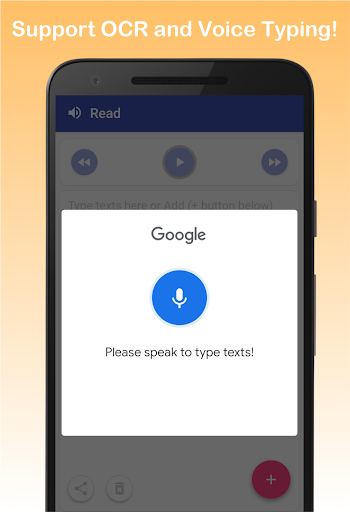
2. You can input or type text easily via google speech recognition
3. You can even scan text from book or real papers via camera-based OCR text scanner and text reader (only latin characters supported)
4. You can load text from your favorite websites (e.g, HTML and web page reader)
5. Still you can type text with keyboard
Support easy control of Text-to-Speech (TTS)
1. Play/Pause/Forward/Backward functions of TTS
2. You can easily change language, speed, and pitch of TTS reading voice
(volume change should be done by physical volume keys)
3. Auto scrolling on text while read aloud on text
It’s ALL FREE
1. No restrictive features (e.g., unlimited read aloud and TTS speak)
2. Unlimited OCR, voice input, web page reading, no words limits
Support sharing feature
1. Share your texts - send an email, copy to clipboard and send to other apps
2. You can easily copy texts from other apps too. Then, paste and read aloud in our main read screen
* We strongly recommend to install google text-to-speech (TTS) engine. Our text to speech app is best compatible to it. Then, our app can read to me.
* For offline use, you need to install text-to-speech (TTS) voice data reader in advance. Please go to setting tab and click "Install TTS voice data". Then, you can download a specific text to speech voice you want.
* We'd appreciate your valuable feedback. Please, report bugs or request features to bluefish12390@gmail.com.