Main Time watch face
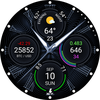

Main Time watch face Summary
Main Time watch face is a with in-app purchases Android app in Personalization by Bosenko. Released in Oct 2017 (8 years ago). Store metadata: updated Jul 24, 2024.
Data tracking: SDKs and third-party integrations were last analyzed on Sep 22, 2025. The app's network data flows (API traffic to/from the app and its SDKs) were last crawled on Jun 16, 2025.
Store info: Last updated on Google Play on Jul 24, 2024 .
SDKs, Trackers & Permissions
Main Time watch face was last scanned for SDKs 2025-09-22. Below is the overview of third party companies detected in the app. The full list of raw SDKs, app permissions and unknown SDKs is available here.
AppGoblin saw Main Time watch face uses 5 Development Tools
 Google
 JetBrains IntelliJ
 Kotlin
AppGoblin saw Main Time watch face uses 1 Analytics: Product
 Firebase
App Details
App Store
Ads & App-Ads.txt
AppGoblin SDK Scans
0★
Ratings:
Screenshots


App Description
Animated watch face with flipping complications
The Main Time watch face support Wear OS watches only.
This watch face is designed for people who need extensive features and many functions. It is more challenging to set up than many others, but it's worth it; try it for free.
You can only configure the watch face directly from the watch only. Long tap the center of the Main Time watch face on your watch to access the watch face selection menu and the Customize button. Tap the Customize button to enter the Main Time watch face settings menu.
Supports 8 flipping complications (two slots for each complication, main and additional + you can add add-ons to each complication).
When you tap the center of the watch face, the hour hands become transparent to make the complications visible.
Built-in complications and features:
• Weather: (need to provide access to your location or manually select a location). The weather complication displays current weather, temperature in the near future, and wind speed. If there is bad weather in the next 18 hours, it will be displayed in the complication. The weather forecast will work without the internet (usually within 2-3 days) based on a previously downloaded forecast.
• Financial data: Currencies, Cryptocurrencies (Bitcoin BTC, Ethereum ETH, etc.), Stocks (AAPL, GOOG, etc.), Futures (gold, Brent oil, etc.), ETFs, and Stock indices (S&P 500, etc.).
• Tides: (need to provide access to your location or manually select a location, not supported in all countries and regions).
• Air pollution: (not supported in all countries and regions).
• Google Calendar events: (need to provide read access from the calendar) Displays events starting in the next 10 hours. If you use another calendar, synchronize it with the Google Calendar. Events are displayed only if they are within the next 10 hours.
• Health Services data: (need to provide read access to exchange data from your fitness program (e.g., Samsung Health) with Health Services on your watch). Only for watches running WearOS 3.0 and later versions. Possible data: heart rate, steps, distance, calories, floors.
• Current date
• Sunrise/Sunset time
• Moon phase
• World time
• Sensors: barometer, altimeter, SPO2 only for Ticwatch 3 (need to provide access to the body sensors on your watch)
• Third-party complications
• Hourly Chime
Built-in a