ServerPulse: Downtime Monitor


ServerPulse: Downtime Monitor Summary
ServerPulse: Downtime Monitor is a ad-supported, with in-app purchases Android app in Tools by Chamela Aluthgedara. Released in May 2025 (1 year ago). It has about 40+ installs Based on AppGoblin estimates, it reaches roughly 4.00 monthly active users and generates around $<10K monthly revenue (65% IAP / 35% ads). Store metadata: updated Aug 10, 2025.
Recent activity: 1.00 installs this week (5.00 over 4 weeks) showing above average growth View trends →
Store info: Last updated on Google Play on Aug 10, 2025 .
0★
Ratings: 0
Screenshots

App Description
Real‑time server, DNS, domain & SSL monitoring with instant alerts.
ServerPulse – Downtime Monitor keeps your IT infrastructure online with real‑timechecks and **instant alerts. Trusted by developers, IT teams & businesses to track servers, DNS, domains & SSL certificates—anytime, anywhere.
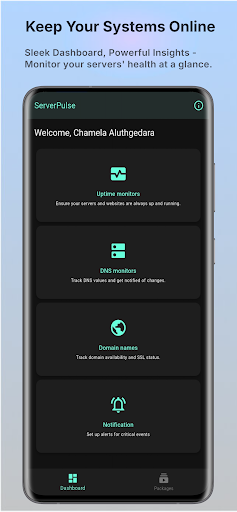
🔍 Comprehensive Monitoring
* Server Uptime: HTTP, TCP/ICMP (ping) & Host/Port checks at custom intervals
* DNS Monitoring: Track A, AAAA, MX, NS, SOA, CAA & TXT record changes
* Domain & SSL: WHOIS lookups and SSL expiry alerts to prevent lapses
🚨 Instant Alerts & Notifications
* Email, Telegram, Slack, Discord, X (Twitter) or custom WebHook URLs
* Customize alert thresholds, retry logic & notification channels
⚙️ Advanced Configuration
* Fine‑tune check intervals, timeouts, HTTP headers & methods (GET/POST)
* SSL certificate validation, cache‑busting & authentication support
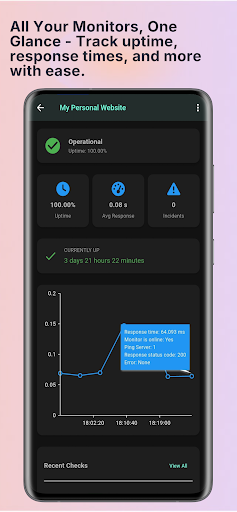
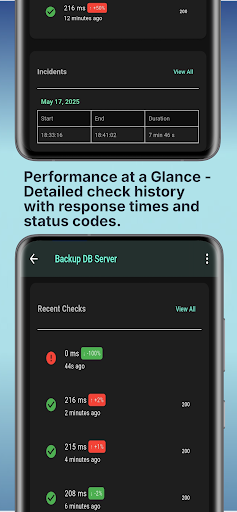
📊 Detailed Insights & Reporting
* Intuitive dashboard: uptime stats, response times & incident logs
* Historical charts and exportable CSV/PDF reports
* Real‑time status page for your team or public audience
💡 Why ServerPulse?
* Lightweight & Reliable – Minimal battery & data usage
* Enterprise‑Grade – Highly configurable for complex infrastructures
* Secure – End‑to‑end SSL, encrypted data in transit
* No‑Code Setup – Onboard in minutes; start monitoring immediately
🚀 Getting Started
1. Add your server, domain or SSL endpoint
2. Choose check type (HTTP, ping, DNS, WHOIS, SSL)
3. Configure intervals & notifications
4. View live status and reports—never miss an outage!
🔒 Policy & Privacy
We respect your data—no personal information collected without consent. See our privacy policy in‑app.
Download ServerPulse now and protect your digital assets with 24/7 monitoring and instant alerts—because uptime matters!