Video Subtitles & Lyrics Maker


Video Subtitles & Lyrics Maker Summary
Video Subtitles & Lyrics Maker is a ad-supported, with in-app purchases Android app in Tools by Chamela Aluthgedara. Released in Feb 2023 (3 years ago). It has about 8.3K+ installs Based on AppGoblin estimates, it reaches roughly 856 monthly active users and generates around $<10K monthly revenue (46% IAP / 54% ads). Store metadata: updated Jul 24, 2025.
Recent activity: 54 installs this week (312 over 4 weeks) showing steady growth View trends →
Store info: Last updated on Google Play on Jul 24, 2025 .
0★
Ratings: 0
Screenshots

App Description
Create captions, subtitles, lyrics & custom watermarks—no watermarks on exports!
Video Subtitles & Lyrics Maker helps content creators, vloggers and editors add professional‑quality captions, subtitles, lyrics and watermarks to any video—fast, flexible and with no watermarks on your exports!
🎬 Key Features
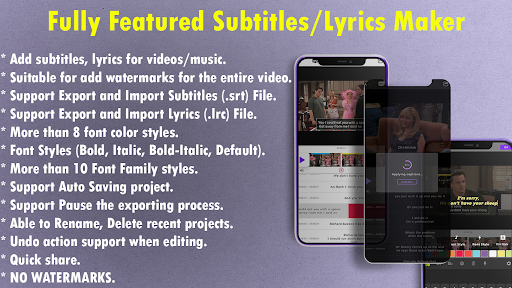
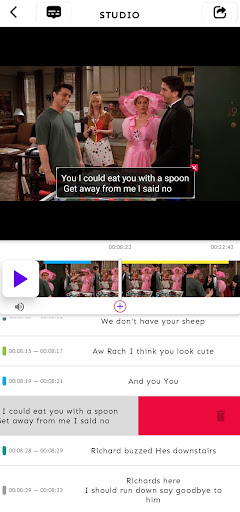
- Add Captions & Subtitles: Create, sync and style .srt subtitles with precise timing controls.
- Lyrics Maker: Import or type .lrc lyrics, sync with music videos for karaoke or lyric videos.
- Custom Watermarks: Protect your content—position text or logo, adjust opacity & size.
- Import & Export: Full support for .srt (subtitles) and .lrc (lyrics) file formats.
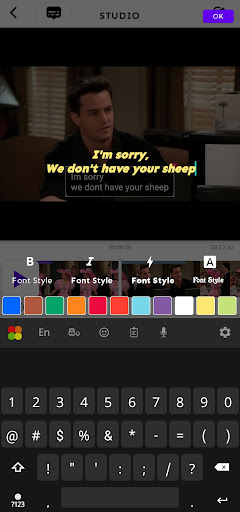
- Text Styling: Choose from 10+ fonts, 8 color presets, bold/italic, outlines & shadows.
- Auto‑Save Projects: Never lose edits—projects save automatically as you work.
- Pause & Resume: Interrupt exports and pick up right where you left off.
- Project Management: Rename, delete or undo changes in recent projects.
- Quick Sharing: Export high‑quality videos and share directly to social media.
- No Watermarks: Exports are 100% watermark‑free—your brand only.
📈 Why Choose Video Subtitles & Lyrics Maker?
- Fully Customizable: Perfectly match your video’s look & feel.
- User‑Friendly: Intuitive interface—no learning curve.
- Efficient: Fast rendering with minimal battery and CPU usage.
- Versatile: Ideal for creators, editors, musicians, educators and marketers.
🚀 Get Started
- Open or import a video project.
- Add captions, subtitles or lyrics.
- Customize text style, position and timing.
- Optionally add a watermark to protect your work.
- Export and share—no watermarks applied!
Download Video Subtitles & Lyrics Maker now and elevate your video content with crisp captions, synced lyrics and secure watermarks—all in one app!