Citizen LinkServer


Citizen LinkServer Summary
Citizen LinkServer is a mobile Android app in Productivity by CITIZEN SYSTEMS JAPAN CO.,LTD.. Released in Mar 2020 (6 years ago). It has about 644+ installs Based on AppGoblin estimates, it reaches roughly 34 monthly active users . Store metadata: updated Sep 12, 2025.
Recent activity: 2.00 installs this week (13 over 4 weeks) showing steady growth View trends →
Store info: Last updated on Google Play on Sep 12, 2025 .
0★
Ratings: 0
Screenshots

App Description
Citizen LinkServer helps you to set up Citizen label printers via USB.
Citizen LinkServer helps you to set up Citizen label printers via USB.
[Supported models]
Designated printer models, firmware versions are required (see below).
- CL-E300 (Firmware Version: EQxx0300 or later)
- CL-E300EX
- CL-E321 (Firmware Version: EQxx0300 or later)
- CL-E321EX
- CL-E303 (Firmware Version: ERxx0300 or later)
- CL-E303EX
- CL-E331 (Firmware Version: ERxx0300 or later)
- CL-E331EX
- CL-S521II
- CL-S531II
- CL-S621II
- CL-S631II
- CL-S700II
- CL-S703II
- CL-S6621
- CL-S700III
- CL-S703III
[Supported interface type]
- USB
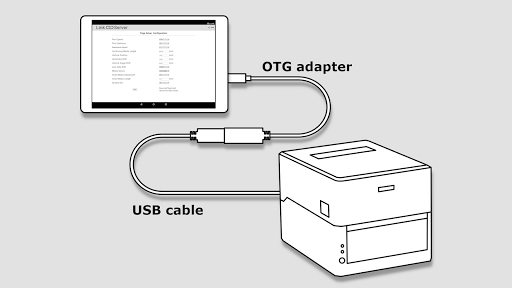
The Android device must work as USB host to control the printer device. For example, you will need a so-called USB OTG (On-The-Go) adapter, which has a micro USB or Type-C male connector on the Android side (depending on your Android device) and a Type-A female connector on the other side. Then you can connect a regular USB cable for printer which has a Type-A male and Type-B male to connect to a printer.
[Example features]
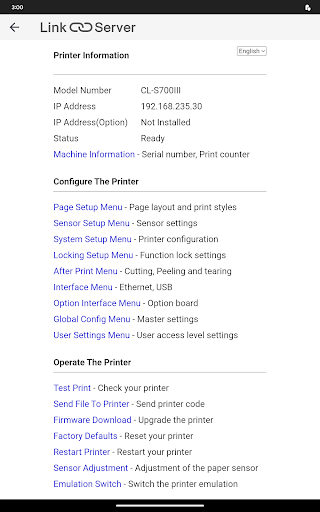
- Checking printer information such as serial number or counters.
- Setting up printing controls such as printing speed, darkness or position.
- Setting up systems such as sensor levels or buzzer.
- Setting up media handlings such as cutter action.
- Setting up communication interface.
- Switching configuration presets.
- Managing access control.
- Printing test labels.
- Sending raw data to the printer.
- Updating firmware.
- Resetting the printer.
- Restarting the printer.
- Switching emulations.