KidsGuard-Parental Control App


KidsGuard-Parental Control App Summary
KidsGuard-Parental Control App is a with in-app purchases Android app in Family by CLEVERGUARD TECHNOLOGY CO.,LIMITED. Released in Oct 2021 (4 years ago). It has about 458.4K+ installs and 953 ratings with a 2.95★ (poor) average. Based on AppGoblin estimates, it reaches roughly 5.9K monthly active users and generates around $<10K monthly revenue (100% IAP / 0% ads). Store metadata: updated Nov 13, 2025, version 46.
Recent activity: 238 installs this week (1.2K over 4 weeks) showing steady growth , and 4.00 new ratings this week View trends →
Data tracking: SDKs and third-party integrations were last analyzed on Mar 12, 2026. The app's network data flows (API traffic to/from the app and its SDKs) were last crawled on Feb 22, 2026.
Store info: Last updated on Google Play on Nov 13, 2025 (version 46).
KidsGuard-Parental Control App was last scanned for SDKs 2026-03-12. Below is the overview of third party companies detected in the app. The full list of raw SDKs, app permissions and unknown SDKs is available here.
 Jake Wharton
 Kotlin
 Firebase
 Google Analytics
 Facebook
 Google
 Huawei Analytics
 MapBox
2.95★
Ratings: 953
Screenshots

App Description
Online tracker,Games blocking,Monitor Screen Time,website Filter,Family locator
😔 Concerned about your child's teenage years? Issues like self-harm, suicide, explicit content, bullying, anxiety, and depression can be overwhelming.
🙂 Are you looking for a way to monitor your child's device remotely?
😜 Want an app that blocks inappropriate content and allows parents to monitor their child's online activity?
KidsGuard is the ultimate parental control tool, providing a safe and healthy solution to keep your child secure online. 👨👨👦👦
🎉 Download KidsGuard now and become a tech-savvy parent in the digital age!
🔥 Key Features:
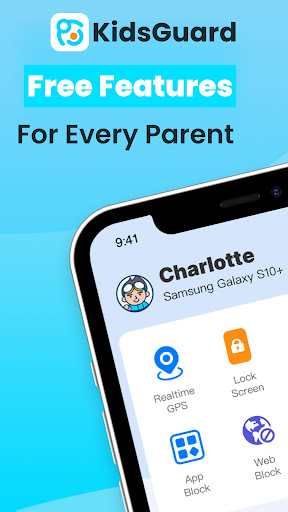
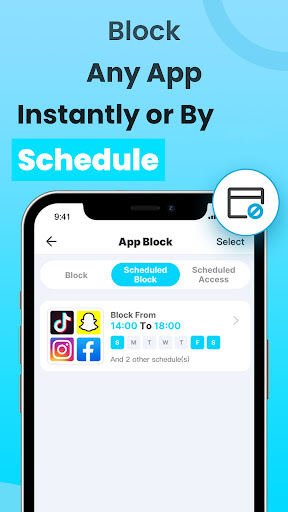
🔴 Flexible App Restriction and Blocking
- No more worrying about your kids spending too much time on TikTok or games.
- KidsGuard is the perfect tool to limit TikTok screen time and control the use of YouTube, WhatsApp, Facebook, Twitter, Instagram, Twitch, and any other apps on your child's device.
🟡 Instant Screenshots and Device Lock
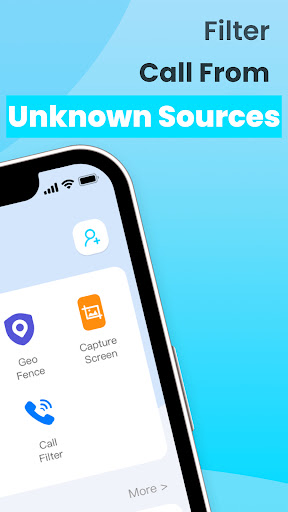
- Remotely take screenshots or instantly lock the screen with one click.
- You can schedule unlock times or manually unlock the device anytime, ensuring your child's safe use.
🟢 Real-Time Location Tracker
- Track your child's real-time location 24/7 and set up geofences. Get instant alerts when they enter or leave home, school, or any other specific area.
- Always know where your child is, keeping them safe.
🔵 Comprehensive Usage Reports
- Our detailed device usage reports help you understand how your child uses their device daily.
- Ensure your child's safety by monitoring their online behavior.
🟤 Supports Most Devices
- Compatible with most Samsung, Xiaomi, Motorola, and Android models.
- Track smartphone activities around the clock.
🟣 Website Control and Blocking
- Use our pre-set categories to block all malicious, harmful, adult, and inappropriate content.
- You can also add specific websites or URLs to block, preventing your child from accessing unsuitable sites.
👉 Let KidsGuard be your family's guardian:
- Screen time control, location tracking, and social media monitoring for platforms like WhatsApp, YouTube, Facebook, Instagram, TikTok, and more, ensuring your child's online safety.
- Game and adult content blocking, protecting your child from harmful content.
💡 How to Use KidsGuard - Parental Control App and Location Tracker?
1.📱 Download KidsGuard on your device and create an account.
2.📲 Install《 KidsGuard Jr 》on your child's device.
3.🔗 Link the two devices.
4.🔧 Use the KidsGuard dashboard to manage screen time, block apps or websites, and take screenshots.
⛔ Note: KidsGuard may require permission on your child's device. Granting all permissions is essential for the app's proper functioning.
🌐 About the Developer
ClevGuard is a global software development leader with offices worldwide. Our top apps, like KidsGuard For Chat App and ClevGuard-Anti Spy Scanner, are used in over 150 countries, with over a million monthly active users.
📣 If you think KidsGuard - Parental Control App is the perfect solution for your needs, share it with your friends!
📧 If you have any questions or need technical support, don't hesitate to get in touch with us via email: support@clevguard.com
🌐 For more information, please visit our website: https://www.clevguard.com
📜 To learn more about our privacy policy: https://www.clevguard.com/privacy-policy/
📄 To read our End User License Agreement: https://www.clevguard.com/eula/