Third Eye


Third Eye Summary
Third Eye is a mobile Android app in Productivity by Meet B. Released in Apr 2025 (1 year ago). It has about 289+ installs Based on AppGoblin estimates, it reaches roughly 27 monthly active users . Store metadata: updated Apr 25, 2025.
Recent activity: 6.00 installs this week (28 over 4 weeks) showing steady growth View trends →
Store info: Last updated on Google Play on Apr 25, 2025 .
0★
Ratings: 0
Screenshots



App Description
Gemini AI-powered assistant app designed to help blind users daily.
Third Eye is an innovative Android application designed to assist blind and visually impaired individuals by leveraging the power of Gemini AI. The app enhances accessibility and independence by allowing users to interact through voice commands and visual inputs, enabling them to perform daily tasks with confidence and ease.
Whether you want to ask questions, understand what's in front of you, extract text from an image, or describe your surroundings, Third Eye is your intelligent companion for the journey. All features are optimized for simplicity, clarity, and real-time responsiveness.
🔍 Key Features:
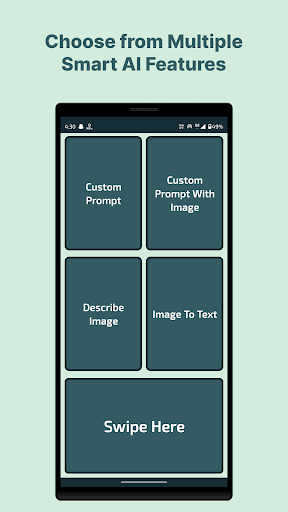
🧠 1. Custom Prompt
Use voice or text to ask any question or give instructions to Gemini AI.
Speak or type your request directly in the app.
Receive intelligent, helpful responses tailored to your needs.
Perfect for general assistance, information, or support.
🖼️ 2. Custom Prompt with Image
Combine a visual input with a custom query for more accurate, context-aware responses.
Upload or capture an image.
Ask a question or describe the image context.
Let Gemini AI analyze both inputs and respond accordingly.
👁️ 3. Describe Image
Get a clear, concise description of what’s in an image.
Capture or upload a photo using the app’s camera feature.
The app will describe the contents of the image using AI.
Great for understanding surroundings or visual documents.
📝 4. Image to Text (OCR)
Extract text from images using real-time processing.
Upload or take a picture containing printed or handwritten text.
Instantly convert it into readable text.
Useful for reading signs, labels, or printed material.