Smartphone TPV


Smartphone TPV Summary
Smartphone TPV is a mobile Android app in Finance by Comercia Global Payments. It has about 34.8K+ installs Based on AppGoblin estimates, it reaches roughly 11K monthly active users . Store metadata: updated Mar 6, 2026.
Recent activity: 1.7K installs this week (34.8K over 4 weeks) View trends →
Store info: Last updated on Google Play on Mar 6, 2026 .
0★
Ratings: 0
Screenshots

App Description
Turn your smartphone into a POS
Smartphone POS is the solution aimed at businesses, professionals and freelancers that allows you to accept contactless payments of any amount on your mobile phone quickly and easily and without the need for additional hardware.
A perfect application to cover your payment needs, providing you with mobility, flexibility and comfort.
The Smartphone POS application is compatible with Android devices version 8 or higher and with a card reader (NFC).
With Smartphone POS you can:
- Make sales and manage returns from the same application.
- Consult in real time the history of operations and the details of each one of them.
- Accept payments with VISA and MasterCard cards of any amount from your mobile phone quickly and easily.
- Perform operations that require PIN.
- Send the receipt to your customers by email or by QR.
- Charge anywhere with your smartphone without having to depend on additional hardware devices.
- Improve your customers' shopping experience by being more efficient at peak times by offering another point and method of payment.
How does it work?
1. Download the Smartphone POS application on your mobile.
2. Enter the credentials that we have provided you from the email no-reply@comerciaglobalpay.com.
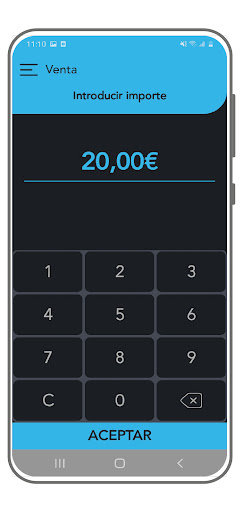
3. To make the sale, enter the desired amount on the main screen of the application.
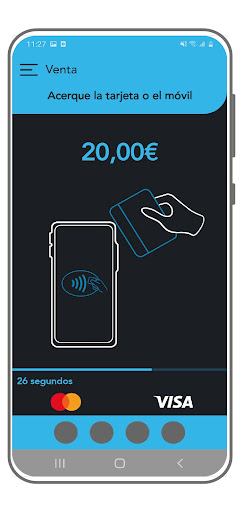
4. The customer must bring the card or mobile device closer to the NFC reader of the mobile, behind the smartphone, to make the payment.
5. If the operation requires it, the application will request the PIN code.
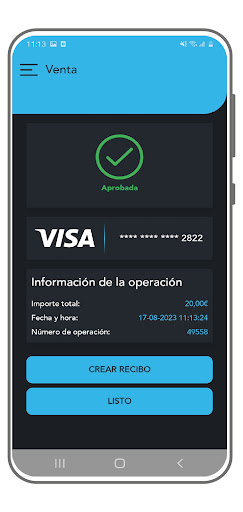
6. The operation will be confirmed and the option to create a receipt will appear.
7. The ticket will be forwarded to the customer using the method you select:
-- show receipt on screen
-- send it by email
-- via QR.
8. You can see the detail of the operation in the History.