Tiny Download Manager


Tiny Download Manager Summary
Tiny Download Manager is a mobile Android app in Tools by Complete_Apps. Released in Oct 2023 (2 years ago). It has about 9.5K+ installs and 74 ratings with a 3.99★ (average) average. Based on AppGoblin estimates, it reaches roughly 529 monthly active users . Store metadata: updated May 11, 2025.
Recent activity: 53 installs this week (221 over 4 weeks) showing steady growth , and 1.00 new ratings this week View trends →
Store info: Last updated on Google Play on May 11, 2025 .
3.99★
Ratings: 74
Screenshots

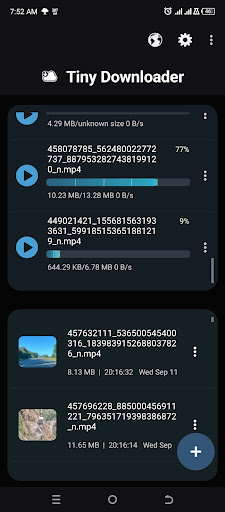
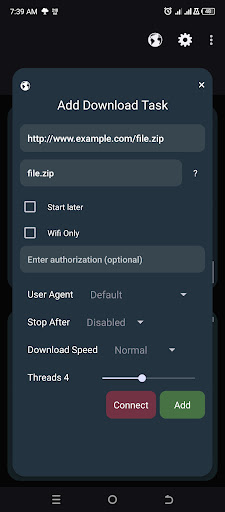
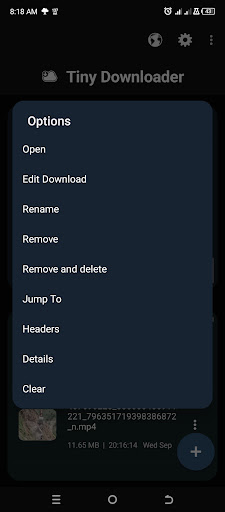
App Description
A tiny powerful download manager and video downloader
Tiny Download Manager (IDM) is a free fast file downloader for downloading files from websites and cloud storage such as HD videos, music, movies, pdf etc. Tiny Download Manager (IDM) is an advanced download manager that suits all your file download needs. It also has turbo downloader to accelerate large files such as movies and large zip files. Tiny Internet Download Manager had an in-built browser to download files that require login or JavaScript to work
Features
- Clean Interface and easy to use
- Lightweight IDM file downloader that is just around 2MB to download
- Open files such as videos before they have complete downloading
- Accelerated turbo downloader and music downloader
- Can download up to 5 files simultaneously
- Supports pause and resume download
Edit download link to resume expired links
- Show download notification that include percentage, speed and time remaining
- Seek a download item to specific percentage to save data
- Auto Pause download after a specific download size
- Change buffer size for fast download
- Download to SD card or internal Storage
- Continue Broken downloads
- Download Video and audio streaming files
- Support large files
- Schedule to download later
- Specify to download through WIFI only
- Download in background Service
- Provide send option for finished downloads
- Advanced download management for large files
- No Ads
Capabilities
- Video downloader
- Facebook downloader
- Multiple file downloader
- Streaming Downloader
Browser Features
Enable desktop view
Show history
Enable/Disable Images and JavaScript
Include Search Engine
Usage
To use Tiny Internet Download Manager, you click the plus button, enter the download link, then click Add Button. To view the download details before downloading first click the Connect Button. Alternatively, You can use the browser to browse video download and file download sites. When browsing a streaming site use the orange button to download music and video download media which might be found in the site. Long click the download item to open a list of options such as Open, Rename, Delete etc
Privacy Policy
This app does not collect any of the user data. Although when using the browser the sites you visit are not guaranteed to do so.
N.B
Some sites do not support pause and resume
Some sites provide low download speeds
Some sites make their download link to expire after certain period
This app is not meant for downloading copyrighted files. It also does not download YouTube videos because it is not allowed by Google Terms.