Ease Joypad


Ease Joypad Summary
Ease Joypad is a ad-supported, with in-app purchases Android app in Tools by CREA Software Systems. Released in Jul 2018 (7 years ago). It has about 16K+ installs and 62 ratings with a 2.94★ (poor) average. Based on AppGoblin estimates, it reaches roughly 208 monthly active users and generates around $<10K monthly revenue (37% IAP / 63% ads). Store metadata: updated Feb 21, 2024.
Recent activity: 3.00 installs this week (67 over 4 weeks) showing below average growth View trends →
Store info: Last updated on Google Play on Feb 21, 2024 .
2.94★
Ratings: 62
Screenshots


App Description
Control your Android device with a joystick, gamepad, keyboard or switches
With Ease Joypad you can perform –using a joystick, gamepad, keyboard or switches– all those actions that allow you to control your mobile device. It provides advanced functions to work with your Android device. For instance:
– Dwell click. Makes click without needing to press any button.
– Gestures made easy. Most common gestures (e.g. tap, double tap, drag, swipe, pinch, etc.) can be performed with just one click.
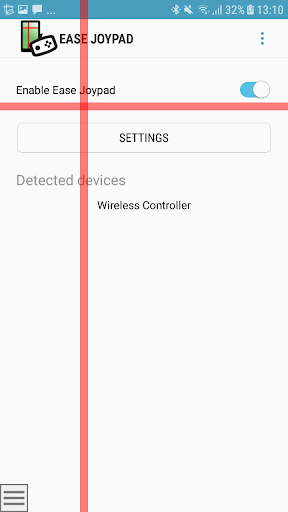
– Visibility. A big cross makes the cursor more visible.
If you are a person with a traumatic brain injury, cerebral palsy, multiple sclerosis, parkinsons, essential tremors; or you are a relative, caregiver or assistive technology professional, this App is of your interest.
REQUIREMENTS
Ease Joystick works for tablets and smartphones with Android 7.0 or higher.
HOW IT WORKS?
You can link the buttons of your input device to the actions that allow you to move the pointer, make click and perform other operations.
It provides three modes for clicking:
– Dwelling. Once the cursor is stopped, it starts a countdown and the click is performed when the dwell time is over. A big cross gradually shrinks providing feedback to you.
– Standard click, using any button of the input device
– Ease click. To avoid undesired clicks as a result of tremors or other causes, it is possible to set a time you must maintain the button pressed before the click is accepted.
Additionally, you could set up another time interval in which button presses will be ignored after clicking.
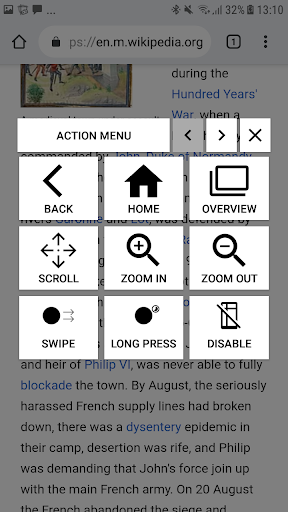
An on-screen menu allows you to choose the desired gesture or another action to perform. You can go back or home, open notifications, show running Apps, zoom in and out, scroll contents and perform swipe or pinch gestures, for instance.
AccessibilityService API use
This app uses the AccessibilityService API in accordance with the Accessibility API Policy. This API is essential to provide the accessibility features of this app, namely, intercepting the screen touches and performing the gestures required by the user.
THANKS
We express our gratitude to the Fundació ASPACE Catalunya (Barcelona), Associació Provincial de Paràlisi Cerebral (APPC) of Tarragona, Federación Española de Parkinson, Associació Malalts de Parkinson de l’Hospitalet i Baix Llobregat and Vodafone Foundation for helping us to test and improve