Digital Watch Face CUE111


Digital Watch Face CUE111 Summary
Digital Watch Face CUE111 is a mobile Android app in Personalization by Creation Cue. Released in Apr 2024 (2 years ago). It has about 2.9K+ installs and 48 ratings with a 4.60★ (excellent) average. Based on AppGoblin estimates, it reaches roughly 34 monthly active users . Store last updated Aug 4, 2026
Recent activity: 6.00 installs this week (35 over 4 weeks) showing steady growth , and 1.00 new ratings this week View trends →
Digital Watch Face CUE111 SDKs Summary
App not yet scanned for SDKs.
4.6★
Ratings: 48
Screenshots


App Description
Stylish & customizable watch face for ultimate personalization.
Features include:
▸24-hour format or AM/PM (without leading zero - based on phone settings).
▸Add or remove watch hands.
▸Heart rate display with marker for High/Low zones.
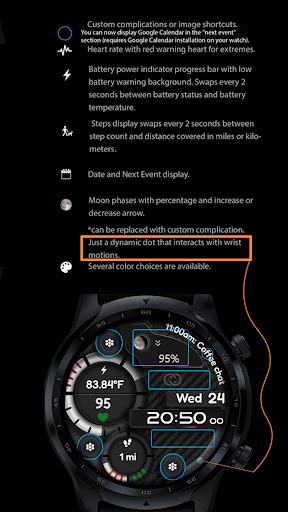
▸ Steps count. Distance measurements are displayed in kilometers or miles, accompanied by a moving percentage indicator towards the target. Steps display swaps every 2 seconds between step count and distance covered in miles or kilometers. You can set your step target using the health app.
▸Battery power indication with low battery red flashing warning background. Swaps between power and battery temperature in °C or °F.
▸Upcoming events display.
▸Moon phase progression percentage with increase or decrease arrow. Can be replaced with custom complication. Select empty to bring back the moon phases display.
▸3 AOD levels.
▸You can add 7 custom complications on the watch face (2 Short text complications, 1 long text complication, 3 image shortcuts and Next Event or Text App shortcut). You can now display Google Calendar in the "next event" section (requires Google Calendar installation on your watch).
▸Multiple color themes available.
Only for Wear OS devices - API 33+ like Samsung Galaxy Watch 4, 5, 6, Pixel Watch etc.
Feel free to experiment with the different areas available for custom complications to discover the optimal placement that suits your needs and preferences.
If you encounter any problems or installation difficulties, please contact us so we can assist you with the process.
Email: creationcuespace@gmail.com