Skin Editor 3D for Minecraft


Skin Editor 3D for Minecraft Summary
Skin Editor 3D for Minecraft is a ad-supported, with in-app purchases Android app in Tools by Crone. Released in Aug 2016 (9 years ago). It has about 17.2M+ installs and 111.2K ratings with a 4.39★ (good) average. Based on AppGoblin estimates, it reaches roughly 1.9M monthly active users and generates around $100K+ monthly revenue (28% IAP / 72% ads). Store metadata: updated May 13, 2026.
Recent activity: 20.7K installs this week (66.3K over 4 weeks) showing below average growth , and 84 new ratings this week View trends →
Data tracking: SDKs and third-party integrations were last analyzed on Apr 23, 2025.
Store info: Last updated on Google Play on May 13, 2026 .
SDKs, Trackers & Permissions
Skin Editor 3D for Minecraft was last scanned for SDKs 2025-04-23. Below is the overview of third party companies detected in the app. The full list of raw SDKs, app permissions and unknown SDKs is available here.
AppGoblin saw Skin Editor 3D for Minecraft uses 11 Development Tools
 Square
 Divkit
 Greenrobot
 JetBrains IntelliJ
AppGoblin saw Skin Editor 3D for Minecraft uses 4 Mediation
 AppLovin
 AdMob
AdMob Unity
Unity Yandex
AppGoblin saw Skin Editor 3D for Minecraft uses 22 Ad Networks
 Facebook
 Appodeal
 Google
AppGoblin saw Skin Editor 3D for Minecraft uses 4 Analytics: Attribution
 AppsFlyer
 Adjust
 Yandex Metrica
 AppMetrica
AppGoblin saw Skin Editor 3D for Minecraft uses 1 Analytics: Product
 Firebase
AppGoblin saw Skin Editor 3D for Minecraft uses 1 Business Tools
App Details
App Store
Ads & App-Ads.txt
AppGoblin SDK Scans
4.39★
Ratings: 111.2K
Screenshots
App Description
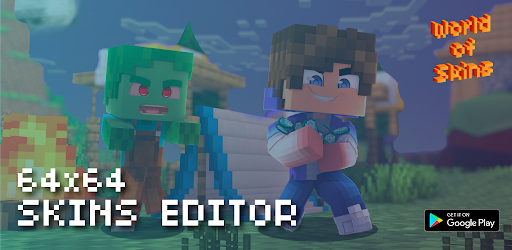
Create skins and install them in the game or on server.
We present the 3D Skin Editor for Minecraft
Skin Editor is work with original Minecraft skins with a base resolution of 64x64 pixels.
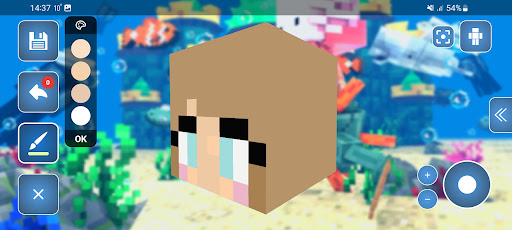
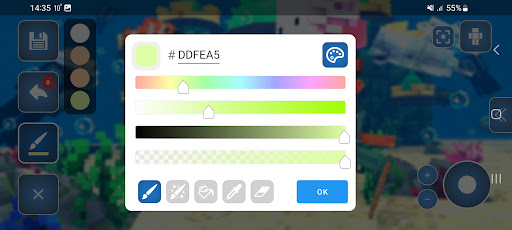
This editor has an RGB color palette with the ability to save a separate palette and sort colors.
Standard kits:
-pipette
-bucket
-brush
-eraser
-gradient (you can draw with colors from the palette)
Many mods support transparency of skins. The palette has an alpha channel (transparency).
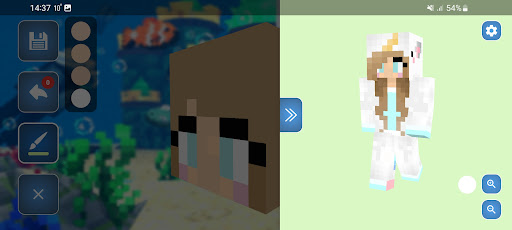
Editing occurs by body parts, with the ability to select them. For convenience, arms or legs can be edited in mirror mode.
To see the full edited skin open the right side where you can set the background color, and set walk mode of the skin.
If you accidentally make a mistake and click on the wrong pixel, then the system of returning to the previous action will help you.
You can also change the editing background in the settings on the main screen or change the editing orientation, for example, from horizontal to vertical or disable the joystick so you can rotate part of the skin with your fingers.
The application has a Skins Collection section, which contains skins from the World of Skins application, more than 200,000 skins on any topic with the ability to search. Once you find the skin there, you can edit it.
There is also a My Skins section, it contains your saved skins from the editor, where you can view them in more detail, change the type Alex or Steve abd install them in the game.
The application has autosave, it automatically saves your skin so that your editing progress is not lost. If you accidentally close the application, your progress will also be saved, but without the color picker
In addition the editor supports two layers of skins which allows you to add the details of the relief of your skin.
DISCLAIMER:
This is an unofficial application for Minecraft. This application is not affiliated in any way with Mojang AB. The Minecraft Name, the Minecraft Brand and the Minecraft Assets are all property of Mojang AB or their respectful owner. All rights reserved. In accordance with
https://www.minecraft.net/en-us/usage-guidelines