Smart Data Switch: Phone Clone


Smart Data Switch: Phone Clone Summary
Smart Data Switch: Phone Clone is a ad-supported, with in-app purchases Android app in Productivity by Art & Tool Studio. Released in Feb 2025 (1 year ago). It has about 69.2K+ installs and 85 ratings with a 4.20★ (good) average. Based on AppGoblin estimates, it reaches roughly 3.9K monthly active users and generates around $<10K monthly revenue (45% IAP / 55% ads). Store metadata: updated May 23, 2026.
Recent activity: 260 installs this week (1.2K over 4 weeks) showing below average growth , and -1 new ratings this week View trends →
Store info: Last updated on Google Play on May 23, 2026 .
4.2★
Ratings: 85
Screenshots


App Description
Smart Data Transfer allow you to move photos, videos & files between devices app
Data Transfer – Phone Clone for Android
📱Data Transfer is a reliable and secure phone clone app designed to move your data seamlessly from one phone to another. With this easy phone transfer, copy my data app, transferring contacts, photos, music, and other important files from your old device to a new one. Data transfer phone clone app supports a wide variety of file types and allows users to copy all their data without cables. Whether it’s contacts, media files, or documents, Smart Switch copy my phone app ensures your content moves safely and efficiently.
🌐Copy My Data makes transferring your information from one phone to another. Connect two smartphones effortlessly using a QR code for wireless transfer. Clone your device without losing any contacts, documents, photos, or videos on your new phone. Data sharing app offers to transfer your data and cloning for Android devices, making it one of the unique smart switch data transfer clone apps. Share essential information like images, audio, videos, and contacts without errors or delays. Its speed and reliability make it an ideal choice for anyone switching devices.
✨Key Features of Smart Switch:
📱 Effortlessly transfer my data from old to new devices
📱 Share videos, music, photos, contacts, and documents easily with Smart Switch phone content share app
📱 Supports all file formats with Smart Switch file transfer app
📱 Direct transfer using Wi-Fi or internet connection
📱 Generate QR codes for sharing
📱 No size limits – send large files hassle-free
📱 Safe and secure transfer, ensuring no data loss
📱 One-click data copy and full device cloning
💡 How Smart Switch App Works:
1. Install Smart Switch Mobile Transfer App on both devices for phone migration.
2. Choose “Send” on your old phone and “Receive” on your new phone.
3. Select the data you want to transfer and start moving, Files Transfer in minutes!
🌟Why Smart Switch?
Smart Switch & transfer my data app is perfect for anyone looking for a smooth, dependable, and easy data transfer app. With its simple interface and advanced features, you can move all your files safely and quickly, anytime and anywhere.
🌟 Why People Choose Us?
->Intuitive & Easy-to-Use Interface
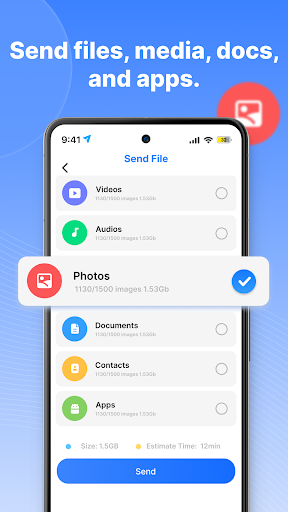
The app organizes your files into categories like audio, apps, and images, making it simple to manage and share your data efficiently.
->Secure File Sharing
With the Copy My Data app, you can enjoy safe and smart file sharing. All transfers are reliable and ensure no data is lost during the process.
->Phone Cloning Made Simple
The Smart Transfer My Data app allows you to clone your phone quickly, including contacts, photos, videos, and apps. Send large files between devices effortlessly and switch phones without any complications.
->Share Data with Friends & Family
Transfer all your mobile content quickly and securely using the Smart Mobile Data Transfer app. This tool makes sharing and migrating your data between devices easy and convenient.
📦 Types of Data You Can Move:
• Contacts and call information
• Photos and videos
• Complete phone content
• Music files
• Documents and other essential files
📳 Download Smart Switch now and enjoy seamless smart switch mobile data transfer with complete security and speed!
Privacy policy: https://sites.google.com/view/phone-cloner-app/privacy