Thermal Spectrum Camera FX

Thermal Spectrum Camera FX Summary
Thermal Spectrum Camera FX is a ad-supported Android app in Entertainment by dekodit. Released in Dec 2025 (3 months ago). It has about 247+ installs Based on AppGoblin estimates, it reaches roughly 57 monthly active users and generates around $<10K monthly revenue (0% IAP / 100% ads). Store metadata: updated Jan 25, 2026.
Recent activity: 27 installs this week (116 over 4 weeks) showing above average growth View trends →
Store info: Last updated on Google Play on Jan 25, 2026 .
0★
Ratings: 0
Screenshots


App Description
Turn camera frames into vivid simulated thermal images with color FX
🔥 Simulated Thermal Camera — Visual Effect, Not Real Temperature
Thermal Spectrum Camera FX turns your phone’s camera into a visual thermal-style filter.
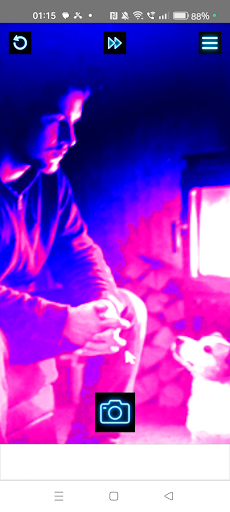
Point the camera, choose a color palette and watch your scene transform into glowing false-color “heatmap” images in real time.
It’s a graphic effect only: the app does not measure real temperature or use an infrared sensor. It’s designed for creative fun, screenshots and visual experimentation, not for safety or diagnostics.
✨ Main features
• Live camera view with thermal-style color mapping
• Multiple thermal palettes (from cold blues to hot reds and whites)
• Adjustable thermal sensitivity to emphasize subtle differences in brightness
• Adjustable contrast to make the effect stronger or softer
• Optional glow/halo to give hot areas extra punch
• Quick “Random” button that picks a new combination of palette and settings
• Rear and front camera support for both scenes and selfies
• Capture button to save the current effect as a photo in your gallery
• Simple side menu for settings, gallery access and app sharing
🎛 Visual control in real time
Use the settings panel to fine-tune the look of the effect while you watch the camera preview:
• Thermal Sensitivity – how strongly the effect reacts to changes in brightness
• Effect Contrast – from soft and smooth to very dramatic
• Glow / Halo – highlight the hottest areas with an extra luminous look
• Thermal Palette – cycle through several color ramps that mimic classic thermal cameras
You can keep it subtle and scientific-looking, or push the colors for a more cyber / sci-fi style.
📸 Capture and explore
When you like what you see, tap the photo button to save an image with the effect already applied.
You can then open your usual gallery app to view, zoom or share your creations.
Use it for:
• Creative selfies with thermal-style colors
• Fun portraits of friends (with their permission)
• Abstract shots of everyday objects
• Eye-catching backgrounds and social media images
🔊 Optional camera sound
If you enjoy an audible shutter, you can enable the camera sound in the settings.
Prefer a silent experience? Just turn it off with a switch.
⚠️ Important disclaimer
Thermal Spectrum Camera FX is only a visual simulation based on the normal camera image.
It:
• Does not measure real temperature
• Does not use a true infrared / thermal sensor
• Cannot be used for medical checks, fever detection or home/industrial safety
• Should not be relied on for any decision that depends on actual heat or temperature
Think of it as a fun thermal-style filter and visual toy, not as a professional instrument.
✨ Try Thermal Spectrum Camera FX and turn everyday scenes into colorful, simulated thermal images — just for fun and creativity.