Delete Account


Delete Account Summary
Delete Account is a ad-supported Android app in Productivity by DKAPPS94. Released in Oct 2020 (5 years ago). It has about 126.8K+ installs and 297 ratings with a 3.09★ (mixed) average. Based on AppGoblin estimates, it reaches roughly 6.1K monthly active users and generates around $<10K monthly revenue (0% IAP / 100% ads). Store metadata: updated Nov 17, 2023.
Recent activity: 1.1K installs this week (12.9K over 4 weeks) showing exceptional growth View trends →
Store info: Last updated on Google Play on Nov 17, 2023 .
3.09★
Ratings: 297
Screenshots



App Description
Delete instagram, facebook, telegram and other social media accounts permanently
Delete facebook, instagram, snapchat, twitter, tiktok and other social media accounts permanently easily and quickly.
Delete Account app give you a direct link to delete instagram, facebook account permanently.
Same for delete or erase snapchat account and delete telegram, twitter or gmail account.
Delete Account app give you a short description for delete tiktok or whatsapp account permanently.
What's in Delete Account 2021 App ?
Delete Account App Includes :
- How to delete facebook account permanently!
- How to delete tiktok account permanently!
- How to delete instagram account permanently!
- How to delete twitter account permanently!
How to Work Delete Account 2021 App ?
=> Example 1
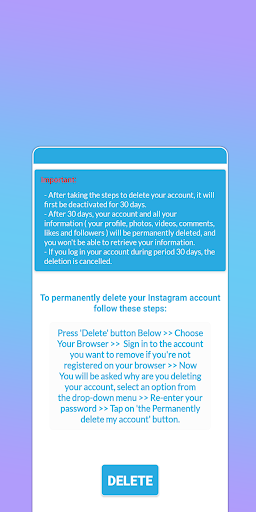
How to delete instagram account permanently?
* Download delete account app and open it.
* Click instagram delete button.
* Read the steps and click on the red button DELETE.
* Choose your Browser and follow the steps that you read on our app.
=> Example 2
How to delete Facebook account permanently?
* Download delete account app and open it.
* Click delete facebook button.
* Read the steps and click on the red button DELETE.
* Choose your Browser and follow the steps that you read on our app.
After doing these steps, will be deactivate your facebook account. and after 30 days he will be permanently deleted.
Delete Account 2021 App is Easy to Use and doesn't require any special permessions. If you have any questions contact us at email.