Document Reader & PDF Editor


Document Reader & PDF Editor Summary
Document Reader & PDF Editor is a free, ad-supported Android app in Tools by FLOW BE. Released in May 2026 (3 months ago). It has about 111K+ installs and 195 ratings with a 4.00★ (good) average. Based on AppGoblin estimates, it reaches roughly 15K monthly active users and generates around $<10K monthly revenue (0% IAP / 100% ads). Store last updated Aug 17, 2026
Recent activity: 3.8K installs this week (16K over 4 weeks) showing declining growth , and 11 new ratings this week View trends →
SDK intelligence: AppGoblin detected 12 ad networks(e.g. AppLovin), 5 development tools, 4 analytics: attribution, 2 business tools, 1 analytics: product,and 1 mediation integrated into Document Reader & PDF Editor. View full SDK list →
Data tracking: The app's network data flows (API traffic to/from the app and its SDKs) were last crawled on Jul 23, 2026.
Document Reader & PDF Editor SDKs Summary
Document Reader & PDF Editor was last scanned for SDKs on 2026-07-15. Below is the overview of third-party companies detected in the app. The full list of SDKs, permissions and unknowns is available here.
Document Reader & PDF Editor has 5 Development Tools SDKs
 Kotlin
 Airbnb Engineering
 JetBrains
 Square
Document Reader & PDF Editor has 4 Analytics: Attribution SDKs
 AppMetrica
 Adjust
 Yandex Metrica
 AppsFlyer
Document Reader & PDF Editor has 1 Analytics: Product SDKs
 Firebase
Document Reader & PDF Editor has 12 Ad Networks SDKs
 AppLovin
 InMobi
 TopOn
TopOn ByteDance
Document Reader & PDF Editor has 2 Business Tools SDKs
Document Reader & PDF Editor has 1 Mediation SDKs
 AdMob
AdMob4★
Ratings: 195
Screenshots


App Description
Edit PDF, Convert Word to PDF, Scan, Merge & Lock PDF
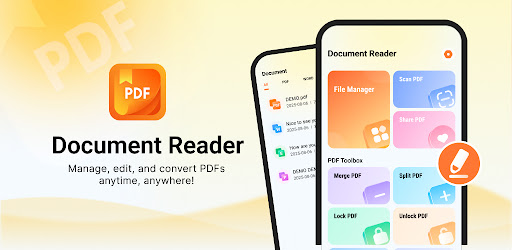
Document Reader is a versatile mobile office tool. Whether you need to view a Word file, edit a PDF, or convert documents on the go, this app can meet your needs.
🔎 View All Major Document Formats
• View PDF, Word (DOC/DOCX), Excel (XLS/XLSX), PowerPoint (PPT/PPTX) files smoothly.
✏️ PDF Editing Tools
• Highlight important text
• Add underlines and strikethroughs
• Doodle with drawing tool
📂 Multiple PDF Tools
• Merge PDF: Combine multiple PDFs into one single file.
• Split PDF: Divide a large PDF into smaller documents.
• Word to PDF: Convert your Word files to PDFs.
• Image to PDF: Convert images to PDF.
• PDF to Image: Export PDF pages as images.
• PDF to Long Image: Convert PDF into a long image.
📷 Camera Scan to PDF
• Use your phone's camera to scan paper documents into PDFs.
🔒 Secure Your Documents
• Protect sensitive files with password.
Have a suggestion? We’re always improving. Contact us at tecnicco2001@gmail.com.